




On this page
- Key takeaways
- Jump to a template
- What should an order delivery email include?
- When should you send delivery emails?
- 10 order delivery email templates you can copy
- Why delivery emails deserve attention
- How to personalize delivery emails without hiding the update
- Can you include promotions in delivery emails?
- What should you check before activating these templates?
- Frequently asked questions
- Related reading
Updated September 2026
Copy-ready emails for shipping confirmations, delivery updates, delays, and more, with subject lines and preview text for every example.
Your customer has paid. Now they want to know where their order is.
An order delivery email updates a customer about their shipment. It should explain the current status, identify the order, provide tracking when available, and say when the package is expected to arrive. If something changes, it should explain what happens next and how to get help.
The best starting point is simple: put the delivery update and tracking link before the brand story or the next offer. Below are 10 order delivery email templates for the moments customers need a clear answer, from the first shipping confirmation to a missed delivery.
Key takeaways#
- Match each email to a confirmed shipping or delivery event.
- Put the order status, tracking link, and estimated arrival near the top.
- Send delay updates promptly, even when a revised delivery date is not yet available.
- Explain partial shipments clearly so customers know which items are still coming.
- Keep support easy to reach and save product-review requests for after customers have had time to use their purchase.
Jump to a template#
- Shipping confirmation
- Out for delivery
- Delivered confirmation
- Delayed shipment
- Partial shipment or backorder
- Failed delivery attempt
- International shipping and customs
- Scheduled local delivery
- B2B delivery confirmation letter
- Cash on delivery
What should an order delivery email include?#
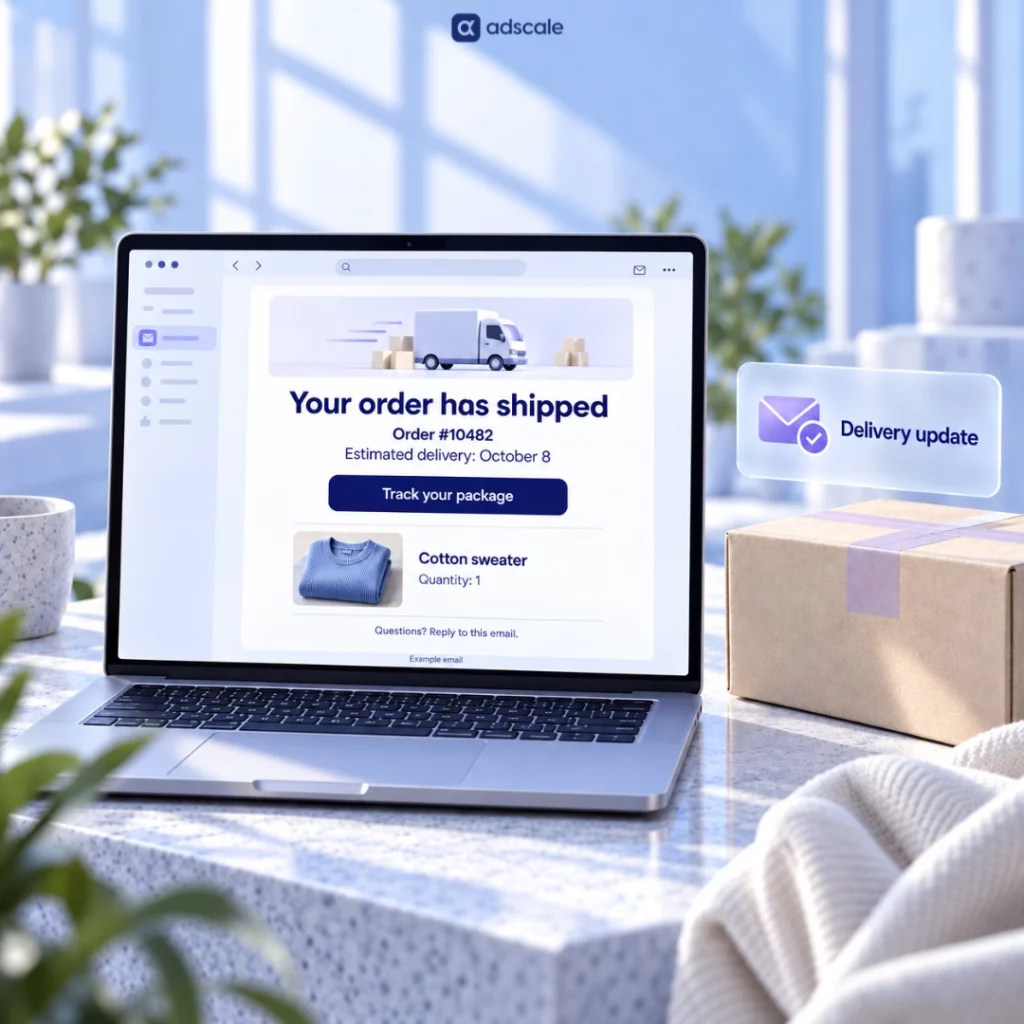
A useful delivery email answers four questions: Which order is this? Where is it? When should it arrive? What should I do next?
| Information | What to include |
|---|---|
| Current status | Shipped, out for delivery, delivered, delayed, or action required |
| Order reference | The order number and, where relevant, the purchase order number |
| Shipment contents | Product names and quantities, especially when an order is split |
| Tracking | A prominent tracking button, carrier name, and tracking number when available |
| Delivery estimate | A date or window labeled as estimated, or a next-update time if the date is unknown |
| Destination | The shipping address or relevant pickup location |
| Support | A monitored reply address or a direct support link |
| Required action | Clear instructions if the customer needs to reschedule, collect, or confirm anything |
Adapt the fields to the message. A delivered email needs the delivery date and location rather than an arrival estimate. An unshipped backorder may not have a tracking link yet.
Use a simple reading order: status, tracking and timing, shipment details, then help. Keep essential information as text so it remains readable when images are blocked.
When should you send delivery emails?#
Use the actual order or carrier event to trigger each message. Creating a shipping label does not, by itself, mean a package has been handed to the carrier.
| Recommended trigger | |
|---|---|
| Shipping confirmation | Confirmed carrier handover or an acceptance scan |
| Out for delivery | The carrier reports that the package is out for delivery |
| Delivered | The carrier records delivery |
| Delayed shipment | You learn that the promised shipping or delivery window will be missed |
| Partial shipment or backorder | A split shipment is confirmed or an item becomes unavailable |
| Failed delivery attempt | The carrier reports an unsuccessful attempt |
| International shipping | Confirmed dispatch, with the applicable customs information |
| Scheduled local delivery | A delivery appointment is confirmed |
| B2B delivery confirmation | Receipt is recorded and supporting delivery details are available |
| Cash on delivery | Dispatch is confirmed, with the payment amount and accepted methods |
If you notify customers when a label is created, describe the order as being prepared for shipment. Send the shipped confirmation once handover is confirmed. Likewise, an estimated arrival date alone should not trigger an “out for delivery” email.
10 order delivery email templates you can copy#
Replace the bracketed fields with accurate order details. They are writing placeholders, not working merge tags: map them to your email platform’s fields before activating the flow. Remove any line that does not apply, and use only the delivery options and commitments your store can support.
1. Shipping confirmation email#
When to send: After confirmed handover to the carrier.
Subject: Your order #[order_number] has shipped
Preview text: Estimated arrival: [delivery_date_or_window]. Track your package here.
Hi [first_name],
Your order #[order_number] has shipped with [carrier].
Estimated delivery: [delivery_date_or_window]
Tracking number: [tracking_number][Track your package]
In this shipment: [product_names_and_quantities]
Shipping to: [shipping_address]Tracking updates may take a little time to appear. If the delivery estimate passes or you notice a problem, reply to this email and we’ll check it.
Thank you for shopping with us,
[store_name]
For split orders, list only the items in this package. Use the partial-shipment template below to explain what is coming separately.
2. Out for delivery email#
When to send: When the carrier reports an out-for-delivery event.
Subject: Out for delivery: order #[order_number]
Preview text: [Carrier] expects to deliver your package today.
Hi [first_name],
Your order #[order_number] is out for delivery with [carrier] and is expected to arrive today.
Estimated delivery window: [carrier_provided_window]
[Track your delivery]
Delivery address: [shipping_address]
Won’t be home? Check the carrier’s tracking page for any available delivery instructions or collection options.
Need help? Reply to this email.
[store_name]
Omit the time window when the carrier does not provide one. Add signature requirements only when they apply to that shipment.
3. Delivered confirmation email#
When to send: When the carrier marks the package as delivered.
Subject: Delivery update for order #[order_number]
Preview text: Your carrier has marked this package as delivered.
Hi [first_name],
[Carrier] has marked your shipment for order #[order_number] as delivered.
Delivery date: [date]
Delivery location: [carrier_reported_location]
Items in this shipment: [product_names_and_quantities][View delivery details]
If you cannot find the package, check the delivery details and any usual drop-off location. Still missing? Reply here so we can help investigate.
If an item is damaged, missing, or incorrect, let us know what happened.
Thank you,
[store_name]
Do not assume a delivery scan means the customer has personally received the parcel. Keep this message focused on receipt and support, then request a product review after a suitable usage period.
4. Delayed shipment email#
When to send: As soon as you know the original shipping or delivery window will be missed.
Subject: An update on order #[order_number]
Preview text: Your delivery is delayed. Here is the latest information.
Hi [first_name],
We’re sorry, your order #[order_number] will not arrive within the original delivery window of [original_window].
What happened: [brief_confirmed_reason]
We’re checking the revised delivery timing with [carrier_or_fulfillment_team]. We’ll update you by [date_and_time], even if we are still waiting for confirmation.
[View your order status]
If you need the order for a specific date, reply here. We’ll explain the options available for your order.
We’re sorry for the inconvenience,
[store_name]
If a revised estimate is available, replace the timing paragraph with: “The new estimated delivery window is [new_window]. We’ll let you know if it changes.” Avoid inventing a date or offering a cancellation you cannot fulfill.
For additional scenarios, see our shipping-delay email examples.
5. Partial shipment or backorder email#
When to send: When part of an order ships and the remaining items will follow.
Subject: Part of order #[order_number] has shipped
Preview text: See what is on its way and what will arrive separately.
Hi [first_name],
Your order #[order_number] will arrive in separate shipments.
Shipped: [items_and_quantities]
Estimated delivery: [delivery_window][Track this shipment]
Still to ship: [remaining_items_and_quantities]
Expected dispatch: [dispatch_date_or_window]We’ll send the remaining tracking details once those items ship.
Shipping charges for the remaining items: [accurate_charge_information]
If the timing does not work for you, reply here and we’ll explain the available options for the unshipped items.
[store_name]
If dispatch timing is unknown, give a next-update date instead. For a fully backordered order, change the subject to “Availability update for order #[order_number]” and remove the shipped section.
6. Failed delivery attempt email#
When to send: After the carrier reports an unsuccessful delivery attempt.
Subject: Delivery action needed for order #[order_number]
Preview text: Check the carrier’s next steps for receiving your package.
Hi [first_name],
[Carrier] reported an unsuccessful delivery attempt for order #[order_number] on [date].
Reported reason: [carrier_provided_reason]
[View delivery options]
Next step: [confirmed_redelivery_or_collection_instructions]
Action deadline, if applicable: [deadline]If the instructions are unclear or the delivery address needs attention, reply here and we’ll help check the available options.
[store_name]
Do not assume the customer was absent. Use the reported reason, and include a pickup address or redelivery link only when the carrier has confirmed that option. If no action is required, change the subject to “Delivery update for order #[order_number].”
7. International shipping and customs email#
When to send: After an international shipment is handed to the carrier.
Subject: Your international shipment for order #[order_number]
Preview text: Tracking, estimated arrival, and customs information for your order.
Hi [first_name],
Your order #[order_number] has shipped from [origin_country] with [carrier].
Estimated delivery: [delivery_window]
Tracking number: [tracking_number][Track your package]
Items: [product_names_and_quantities]
Shipping to: [shipping_address]Duties and taxes: [accurate_prepaid_or_recipient_payment_details]
Customs processing may affect delivery timing. If the carrier needs information from you, follow the instructions on its official tracking page.
Questions about a notice or charge? Reply here and we’ll help you check it.
[store_name]
Match the duties-and-taxes wording to the terms shown at checkout. Do not suggest charges are included unless that is true for the order.
8. Scheduled local delivery email#
When to send: Once a delivery appointment has been confirmed.
Subject: Delivery booked for [date]: order #[order_number]
Preview text: Your delivery window and preparation details are inside.
Hi [first_name],
Delivery for order #[order_number] is booked for [date] between [start_time] and [end_time].
Delivery address: [address]
Items: [items]
Preparation: [relevant_access_or_receiving_instructions][View your delivery booking]
Need to request a change? Contact [support_contact] by [change_request_deadline]. We’ll check availability and let you know what is possible.
On delivery day, you can reach us at [delivery_day_contact].
[store_name]
Use this for appointment-based deliveries such as furniture, groceries, or flowers. Include access, refrigeration, or handling instructions only where relevant to the product and service.
9. B2B delivery confirmation letter#
When to send: After a wholesale shipment has been recorded as received.
Subject: Delivery confirmation: PO [po_number] / order #[order_number]
Preview text: Delivery details and shipment documents for your records.
Dear [recipient_name],
Our delivery records show that order #[order_number], associated with PO [po_number], was delivered on [date].
Delivery address: [business_address]
Carrier and reference: [carrier_and_tracking_or_pro_number]
Shipment contents: [SKUs_and_quantities]
Packages delivered: [package_count]
Received by: [recorded_recipient_name_if_available]Documents attached: [actual_document_list]
Please contact [operations_contact] if you identify missing items, damage, or a discrepancy with your receiving records.
Thank you,
[name]
[role_and_company]
Attach the carrier’s proof of delivery or signed receipt when available. A written confirmation summarizes the record; it should not claim there is a signature or attached proof when neither exists.
10. Cash on delivery email#
When to send: After dispatch is confirmed for an order with payment due on delivery.
Subject: Order #[order_number] is on its way: payment details
Preview text: Amount due: [amount_and_currency]. Accepted payment: [methods].
Hi [first_name],
Your order #[order_number] has shipped with [carrier].
Estimated delivery: [delivery_window]
Amount due on delivery: [amount_and_currency]
Accepted payment methods: [confirmed_payment_methods][Track your package]
Items: [product_names_and_quantities]
Delivery address: [shipping_address]Please have the payment ready when the courier arrives.
Questions about payment or delivery? Reply to this email.
[store_name]
Add exact-change instructions only if required. Only offer an online prepayment link if your system can update the courier’s collection amount before delivery. Otherwise, the customer could be asked to pay twice.
Why delivery emails deserve attention#
Delivery updates reach customers while they are waiting for something they have already bought. That makes clear, useful information especially valuable.
In Omnisend’s 2026 email benchmark report, based on its 2025 dataset, shipping confirmation emails recorded a 62.67% open rate and a 16.01% click-through rate. These are platform benchmarks, not promised results for every store. Omnisend also notes that privacy features can inflate measured opens.
Use those numbers as a reason to improve the experience, rather than to add more promotions. Track whether customers can find their order information and get help when needed. Useful measures include tracking-link clicks, delivery-related support contacts per 100 orders, and recurring questions after each notification.
How to personalize delivery emails without hiding the update#
Keep the essential shipping information consistent. Personalize the extra help around it.
| Customer or product | Useful addition |
|---|---|
| First-time buyer | A short explanation of where to find order help or returns information |
| Repeat buyer | A brief thank-you without repeating a long brand introduction |
| Apparel order | Size and color in the item summary |
| Electronics or home products | A relevant setup guide or preparation checklist |
| Perishable delivery | Receiving and storage instructions that apply to the order |
| Wholesale buyer | PO number, carton count, and the documents their team needs |
For products that need explanation, link to a specific care or setup guide below the delivery details. Our article on product tips in order confirmation emails explores this approach earlier in the post-purchase journey.
Customer context also matters after delivery. A first-time buyer, a frequent customer, and someone buying a gift may need different follow-ups. AdScale uses store and customer data to inform Google and Meta advertising; the same broader principle applies here: understand the customer before choosing the next message. See our guide to eCommerce customer segmentation for ways to organize those groups.
Keep later offers relevant to the purchase, and plan them as part of a wider email and SMS marketing strategy.
Can you include promotions in delivery emails?#
Keep the delivery information prominent, and consider sending offers in a separate post-purchase marketing message.
In the United States, the FTC’s CAN-SPAM guidance says an email’s primary purpose determines how it is treated. For messages mixing transactional and commercial content, the subject line and the placement of transactional information matter. Putting an offer below a divider does not, by itself, settle compliance. Requirements also vary by jurisdiction.
For these templates, the simplest editorial choice is to keep the shipment update focused on delivery and support. A separate message can carry recommendations, replenishment reminders, or other offers with the appropriate marketing controls.
What should you check before activating these templates?#
- Test the triggers. Confirm that label creation, dispatch, delivery, and exceptions produce the right messages. Check for duplicate notifications from your store and shipping apps.
- Map the placeholders. Replace the writing placeholders with valid platform fields, and set fallbacks for missing names, estimates, and tracking details.
- Test a split shipment. Check that each email shows the right package, item list, and tracking link.
- Review the mobile version. Make the status and primary button easy to find without a large banner pushing them down the screen.
- Check links and replies. Open the tracking and support links, then confirm that replies reach a monitored inbox.
- Verify every promise. Use actual support hours, carrier options, refund processes, and delivery information. Remove default wording your team cannot honor.
Frequently asked questions#
An order confirmation acknowledges that the store has received an order and summarizes the purchase and payment status. A delivery email updates the customer about fulfillment or shipping, such as dispatch, an expected arrival, a delay, or completed delivery. Each message should reflect what has actually happened.
Use a clear status and a recognizable order reference, such as “Your order #1234 has shipped.” Put the estimated arrival in the preview text if available. Avoid promotional wording that obscures the update, and do not present an estimated delivery date as a guaranteed arrival.
State that the original delivery window will be missed, apologize, and explain the confirmed reason if one is available. Tell the customer what you are checking and when you will update them next. Include an order-status link and a support contact. Do not wait for a new estimate to communicate.
A delivery confirmation email communicates the recorded delivery status. Proof of delivery is the supporting evidence, which may include a carrier record, photograph, signature, or signed delivery document. An email can link to or attach that evidence, but the message alone should not imply that a signed receipt exists.
Send the product-review request after the customer has had a reasonable opportunity to use the item. The right interval depends on the product. Keep the immediate delivered notification focused on confirming receipt and resolving problems, especially when a package is missing or an item has arrived damaged.
Start with the next question your customer will ask#
Build the shipping confirmation first, then check that you have a clear response for delays and delivery problems. Add the remaining templates wherever they match your fulfillment process.
The goal is a message customers can use immediately: where the package is, what happens next, and who will help if something goes wrong.
Related reading#
- Shipping-delay email examples: More ways to explain late or missing shipments.
- Product tips in order confirmation emails: How to add relevant product guidance after checkout.
- Customer segments in eCommerce: How purchase history can inform customer groups and follow-ups.
- Email vs SMS marketing for fashion brands: How to think about the two channels within a lifecycle program.



 Shopify
  WooCommerce
  PrestaShop
  Magento
  BigCommerce
  Opencart
  Wix
Wix 



 ,
,