

What Should eCommerce Store Owners Do After Google’s August 17, 2026 Bidding Update?

Budget-limited Target CPA and Target ROAS campaigns now aim at the number in the settings, not past it. If that number is stale, efficiency can slip without spend going up.

Google did not raise your budgets and did not change the auction. It changed how budget-capped target bidding behaves.

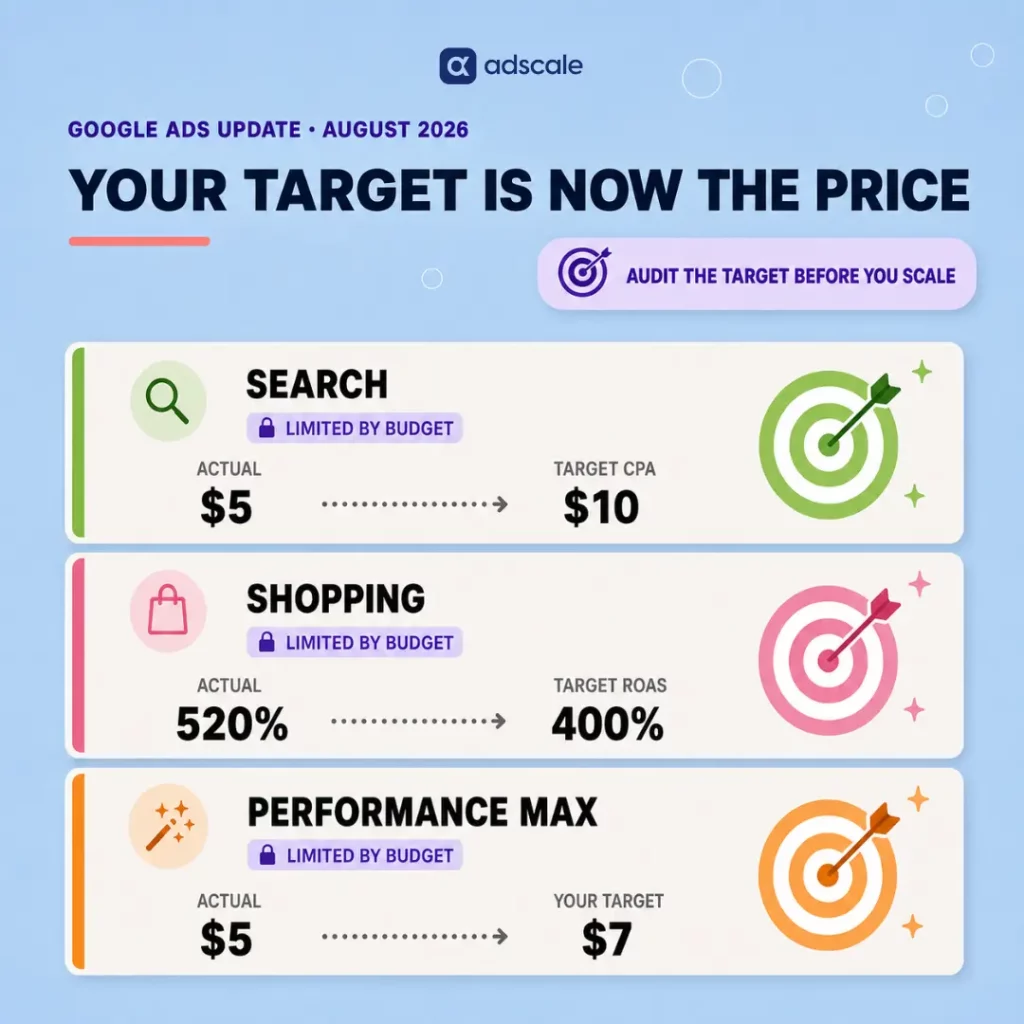
On August 17, 2026, Google began a gradual rollout: campaigns that are Limited by budget and use Target CPA, Target ROAS, or Target CPC (Demand Gen only) will optimize more consistently toward the target you entered, including when you change the budget. Per Google’s official announcement, a $10 Target CPA campaign that has been delivering at $5 will start delivering closer to $10 unless you update the target.

Google will not rewrite your targets or budgets. The job is to decide whether the number in the settings is the efficiency you actually want.

Key Takeaways

  • The change hits budget-limited Search, Shopping, Performance Max, Demand Gen, and Travel campaigns on Target CPA or Target ROAS (plus Target CPC on Demand Gen). Uncapped campaigns are unchanged.
  • If a campaign has been beating its target, inaction can pull CPA up or ROAS down toward that target. Spend caps stay in place.
  • Use the Bid Target Adjustment Tool to keep the current target, apply recent actuals, set a custom number, or switch to Maximize Conversions / Maximize Conversion Value.
  • Wait one to two conversion cycles before judging results. Treat planning-tool forecasts with caution through August 31.

What Changed?

Before this update, a budget-limited Target CPA or Target ROAS campaign could overperform the number in the settings. Raising budget on those campaigns often produced swings, because the system had been buying cheaper than the target allowed.

Google’s stated goal is consistency: after the change, the campaign should stay closer to the target you set, whether it is capped or not. That makes scaling more predictable if the target is right. It removes the unofficial “discount” if the target is an old leftover.

This is a bidding change only. Auction mechanics do not change. Daily and monthly budgets still cap spend.

Who Is In Scope

Campaign typeThis update
Search, Shopping, Performance Max, Demand Gen, TravelYes, when Limited by budget on Target CPA or Target ROAS (Target CPC on Demand Gen)
Display, HotelAlready using the new behavior
App, Video reach, Video viewNo. Previous behavior continues

Also applies in Google Ads, Search Ads 360, Display & Video 360, Google Ads Editor, and the Google Ads API.

Not affected: campaigns that are not limited by budget, plus Manual CPC and Target Impression Share.

Portfolio strategies and shared budgets are included. Change the target at the portfolio or shared-budget level. On a constrained shared budget, the impact is spread across the group.

Performance Max and Demand Gen may also shift traffic across channels as they chase the target more tightly.

What eCommerce Stores Should Do This Week

Shopping and Performance Max on Target ROAS are the usual exposure for stores. Brand Search on a loose Target CPA is the other common one.

1. List the exposed campaigns

Filter enabled Search, Shopping, Performance Max, Demand Gen, and Travel campaigns that use a target strategy and show Limited by budget. Google also sent notifications to accounts that had any such campaign in the last 12 months. Open the Bid Target Adjustment Tool from the “Review your campaign targets” banner, or from Campaigns → campaign Settings → Bidding → Review campaigns. If the tool is missing, Google says it will appear in campaign settings as the rollout continues. Export target vs last-28-day actual CPA or ROAS, spend, conversions, conversion value, and impression share lost to budget.

2. Decide per campaign. Do not apply everywhere

Keep the target if it is still the efficiency you want. After the change, delivery should sit closer to that number. Raising budget is then the volume lever.

Apply recent performance in the tool if the campaign has been beating the target and you want to hold that efficiency. Google’s $10 → $5 example is this path. Skip Apply if the last month included a sale, stockout, or tracking issue. Per Google’s FAQ on this update, the tool also will not recommend a target for campaigns with fewer than 7 conversions. Set a custom target if break-even sits between the old setting and recent actuals. Example from Google: actual $5, old target $10, business target $7. Switch to Maximize Conversions or Maximize Conversion Value only if you want to spend the full budget and will accept a moving CPA or ROAS when the budget changes.

Do the math before you click. Break-even ROAS is roughly 1 / variable margin. If margin after COGS, shipping, fees, and returns is 45%, break-even is about 2.2x. A 4x Target ROAS is a choice. A 1.8x target is a loss. If your current ROAS already looks weak going into this audit, start by diagnosing why before you touch the target.

3. Raise budget only after the target is honest

Google’s point after August 17: you should be able to increase budget without the old efficiency swing, provided the target is the number you want at the new spend. Keep daily budget above average daily spend if you want room to capture demand. Then wait 1 to 2 conversion cycles. On Performance Max, watch channel mix. Automated budget systems already reallocate spend intraday based on where returns are strongest, so a sudden move into Display or YouTube while Shopping falls is the system hunting the target, not a random glitch.

Frequently Asked Questions

Does this affect campaigns that are not limited by budget?

No. Uncapped Target CPA and Target ROAS campaigns already scale toward the stated target. Google says their behavior does not change.

Will my spend go up automatically?

No. Budgets still cap spend. What can change is efficiency: the same budget can buy fewer conversions if an overperforming campaign is pulled toward a looser target.

Should I click Apply in the Bid Target Adjustment Tool?

Only if recent actuals are the efficiency you want and the last weeks were normal. Apply writes recent CPA or ROAS into the target. Otherwise type a custom number, or leave the target if it already matches the goal.

What happens if I do nothing?

Google does not edit the target. Overperforming capped campaigns trend toward the number already in the settings as the rollout reaches them.

Is Maximize Conversion Value safer than resetting Target ROAS?

It is different. Maximize spends the budget and lets efficiency float. Use a corrected Target ROAS when you want to raise budget later at a known efficiency.

Nothing in the auction broke. A setting that used to tolerate overperformance now gets obeyed more strictly.

Open the account. Line up stated target, recent actuals, and break-even for every capped Shopping, Search, and Performance Max campaign. Then pick one honest move: keep the target, rewrite it, or uncap the budget once the target is a number you would defend at twice the spend.

Your target is no longer a comment. Treat it like a price.

Keep Learning

Sources: Changes to target based bid strategies and Frequently asked questions about changes to Target-based bid strategies (Google Ads Help).

How Should You Plan Your Q4 2026 Ad Budget? What the Data and the Benchmarks Actually Show

Most Q4 budgets get built the same way: pull last year’s total spend, add 20%, and hope. That approach misses the part of the data that actually matters, which is not how much you spent, but when.

Is Black Friday Really the Most Expensive Week to Advertise?

We pulled every dollar of Meta ad spend and revenue across our own database for Q4 2024 and Q4 2025. Black Friday and Cyber Monday week came out as the most expensive week within the quarter, both years. Independent benchmark data confirms the same holds true across the full year, not just Q4. That part isn’t a surprise.

What the same sources show is something most Q4 budgets don’t plan for. The pricing pressure doesn’t snap back to normal the moment the weekend ends. Costs stay elevated for days afterward. A budget built around “the big weekend” runs out right when it still needs to hold steady.

Key Takeaways

  • Black Friday and Cyber Monday week is the single most expensive week of the year to advertise on Meta, confirmed by independent benchmark data. In our own database, it was the most expensive week within Q4, both years.
  • That cost pressure doesn’t ease the moment the weekend ends. Benchmark tracking found ad rates still running well above normal for several days afterward.
  • Weekly ad spend more than doubled during Black Friday/Cyber Monday week compared to baseline Q4 weeks, in our database, in both 2024 and 2025. That volume spike lines up with the cost pressure the benchmarks describe.
  • Return on ad spend during Black Friday week was average or below average for the quarter in both years. The volume was exceptional; the efficiency was not.
  • Most merchants still default to a 180-day purchase window for lookalike audiences and never test a shorter one. The small cohort that does test shows a real edge worth checking for your own account.

Why Does Q4 Planning Usually Go Wrong?

I’ve sat through enough Q4 planning meetings to know how this normally happens. Someone pulls last year’s total ad spend. Someone else eyeballs the calendar for Black Friday and Cyber Monday, and the plan becomes “spend more that week.” It is not a bad instinct. It is just aimed at the wrong problem.

The mistake is treating Black Friday as a single day instead of the extended high-cost event the data actually shows it to be. Cost pressure builds before the weekend arrives and doesn’t fully release the moment it ends. A budget built around “the big day” runs out of gas right when it needs to hold steady.

We see this most often with merchants who front-load their entire testing budget into November because “that’s when it counts.” By the time Black Friday week arrives, they’re testing new audiences into the most expensive week of the year. They should already be scaling something they know works.

What Do the Benchmarks Say About Black Friday Ad Costs?

What Meta and Industry Data Say

Tinuiti’s 2025 recap of Black Friday and Cyber Monday found the cost of ad clicks rising through the Thanksgiving-to-Cyber-Monday stretch. Daily CPC ran about 12% higher across those five days than earlier in November, as advertisers compete for a shrinking pool of impressions. Separate Meta ad rate benchmark data going back to 2021 found something else. The week containing Black Friday was the most expensive week of the entire year. Cyber Monday itself was the single most expensive individual day. And that pricing pressure has some staying power. Tracking of the 2024 holiday season found Instagram and Facebook CPMs still running well above the prior year’s rates into December 1st and 2nd. That’s several days after Black Friday itself.

AdScale’s Own Q4 Numbers

Our own database tells the same volume story. In 2025, weekly spend climbed steadily from its late-September baseline to a peak during the week of November 24, up roughly 140%. That’s the week containing Black Friday. Revenue followed the same curve, more than doubling that week compared to a typical week earlier in the quarter. 2024 shows the same shape: spend during Black Friday week was up roughly 150% over the baseline, in the same range as 2025.

Where it gets useful is what happens to efficiency during that peak. Return on ad spend during Black Friday week was 3.79x in 2025. That’s unremarkable next to the 3.92x we saw in early November before the surge even started. In 2024, Black Friday week ROAS was 2.97x, actually below several earlier weeks in the run-up to it. The biggest week of the year by spend and revenue was not the most efficient week in either year. Budget for the volume. Don’t budget for a bonus in efficiency the data doesn’t back up.

60-Day vs. 180-Day Lookalike Audiences

Audience recency is worth a closer look too. Across our full database, only 366 ad sets have ever used a 60-day purchaser lookalike, against 10,729 that used the 180-day default. Most merchants simply never test a shorter window. Narrow that to the ad sets that were actually active with real spend during Q4 2025. That’s a much smaller sample: just 26 ad sets on the 60-day window versus 655 on the 180-day window. The 60-day group had a median return on ad spend of 4.23x, compared to 1.69x for 180-day. That’s a real edge, and reason enough to test it on your own account before you scale into November.

The Reframe: Black Friday Is a Week, Not a Day

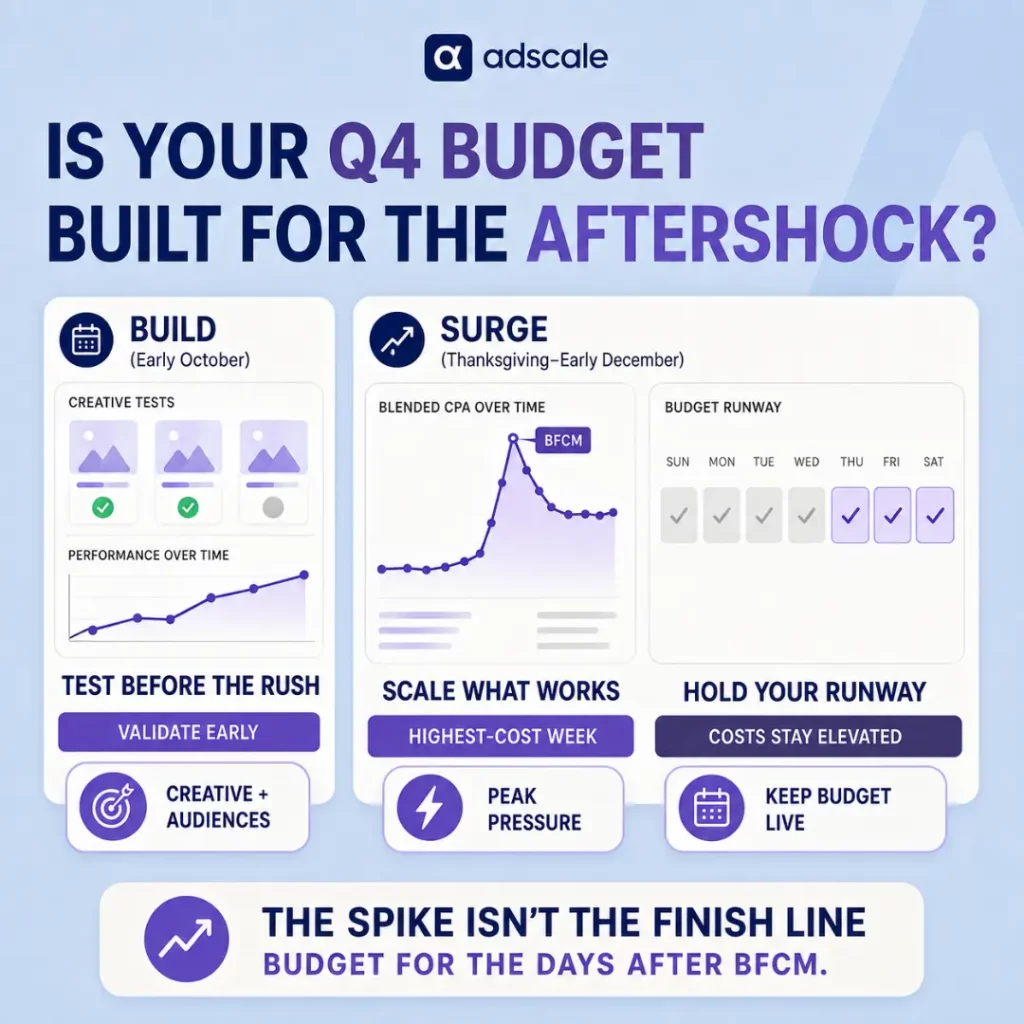
Here is the shift that changes how we plan Q4 internally now. Stop treating Black Friday and Cyber Monday as two isolated days. Start treating the whole stretch, plus the days right after, as one continuous high-cost event:

The Build (early October): Costs are still running at their normal, pre-surge baseline. This is not the moment to go quiet, it’s the moment to test. Run your lookalike window experiments, try new creative, and find your winners while mistakes are cheap.

The Surge (Thanksgiving through the first days of December): This is the single most expensive stretch of the advertising year, confirmed well beyond our own numbers. It’s a volume window and not an efficiency window. Your job is to scale what already works, not to discover what works. Keep your budget steady even after the headline days end, since the pricing pressure doesn’t lift right away.

We call this the Build and Surge calendar internally, and it is the frame we now use for every Q4 budget conversation.

How Should You Change Your Q4 2026 Ad Budget Plan?

The practical shift is moving discovery work out of November and into October. It also means building your Black Friday budget to run several days past Cyber Monday, instead of stopping cold once the weekend ends.

Concretely: if you are planning to test anything new this year, run that test in the first two weeks of October. This applies whether it’s a shorter lookalike window, new creative, or a new offer structure. Costs are still at their normal, pre-surge baseline then, about 8% cheaper on average than what you’ll pay once the Black Friday surge starts. You want your winners identified and validated before the market gets expensive, not discovered in the middle of it.

For Black Friday week itself, build your budget around volume, not around chasing a fantasy ROAS number. If your typical Q4 baseline ROAS is 3.5x, expect Black Friday week to land close to that, not meaningfully above it. Plan your inventory and fulfillment capacity for the revenue spike, and don’t panic if efficiency looks flat.

Then hold that same budget discipline for several days past Cyber Monday. Pricing pressure doesn’t release the moment the sale ends. Pulling back too early just means losing volume during a window that’s still expensive to compete in anyway.

Practical Steps for Your Q4 2026 Calendar

  1. Pull your own Q4 2025 weekly data now, not in October. Chart spend, cost per acquisition, and return on ad spend by week. Confirm whether your account matches the broader pattern of costs staying elevated past the headline Black Friday and Cyber Monday days.
  2. Schedule your audience and creative tests for the first two weeks of October. Set a hard date. If you want to test a 60-day purchaser lookalike against your default 180-day audience, this is the window to do it while mistakes are inexpensive.
  3. Set a Black Friday week budget based on volume targets, not ROAS targets. Decide how much revenue you need that week, and work backward to spend. Don’t assume efficiency will improve just because it is the biggest sales day of the year.
  4. Extend your Black Friday budget several days past Cyber Monday. Don’t assume pricing pressure lifts the moment the weekend ends. Plan for it to hold steady into the first few days of December instead of reacting to it as a surprise.
  5. Re-run your lookalike window test with your own account’s data before scaling into November. A pattern in our cohort isn’t automatically true for you. Confirm it with your own numbers first.
  6. Set a mid-quarter checkpoint in early November. Compare your actuals against the Build and Surge pattern and adjust your remaining budget before, not after, the surge hits.

Frequently Asked Questions

Why doesn’t the cost of acquiring a customer drop right after Black Friday?

Competition doesn’t disappear the moment the weekend sale ends. Benchmark tracking of the 2024 holiday season found Meta ad rates still running well above prior-year levels for several days afterward, into early December. Advertisers keep competing for shoppers still finishing their holiday purchases.

Should I cut my Black Friday week budget since ROAS isn’t higher that week?

No. Black Friday week still generates your highest absolute revenue of the quarter, and that volume is the whole point of the week. The real budget mistake is expecting an efficiency bonus on top of it. Don’t feel disappointed when ROAS lands at your normal baseline instead of above it.

Is a 60-day lookalike audience always better than 180-day in Q4?

Not automatically. It showed a real advantage in the cohort we reviewed, which makes it worth testing on your own account before Q4 ramps up. Treat it as a signal to validate against your own numbers, not a rule to build your whole audience strategy around.

What if my category doesn’t follow this Build and Surge pattern?

Some categories, particularly ones tied to specific gift-giving occasions or with shorter consideration cycles, will shift the timing of these two phases. Pull your own weekly data first. This is a starting hypothesis to test against your account, not a universal rule.

When exactly should I start my October testing window?

Aim for the first one to two weeks of October. This gives you enough runway to reach statistical confidence on any test well before the Black Friday surge begins in late November. Costs jump and competition intensifies sharply across the whole market then, not just your own account.

The Close

Q4 rewards brands that plan around the data instead of the calendar. Black Friday and Cyber Monday will always be the most expensive days of the year to advertise, that part isn’t up for debate. What’s avoidable is planning as if the expensive part ends the moment the weekend does. Build your tests in October while it’s cheap, then keep your foot on the gas for several days longer than the calendar tells you to.

Keep Learning

When Should You Send a Coffee Brand’s Replenishment Email, and Does Winter Change the Timing?

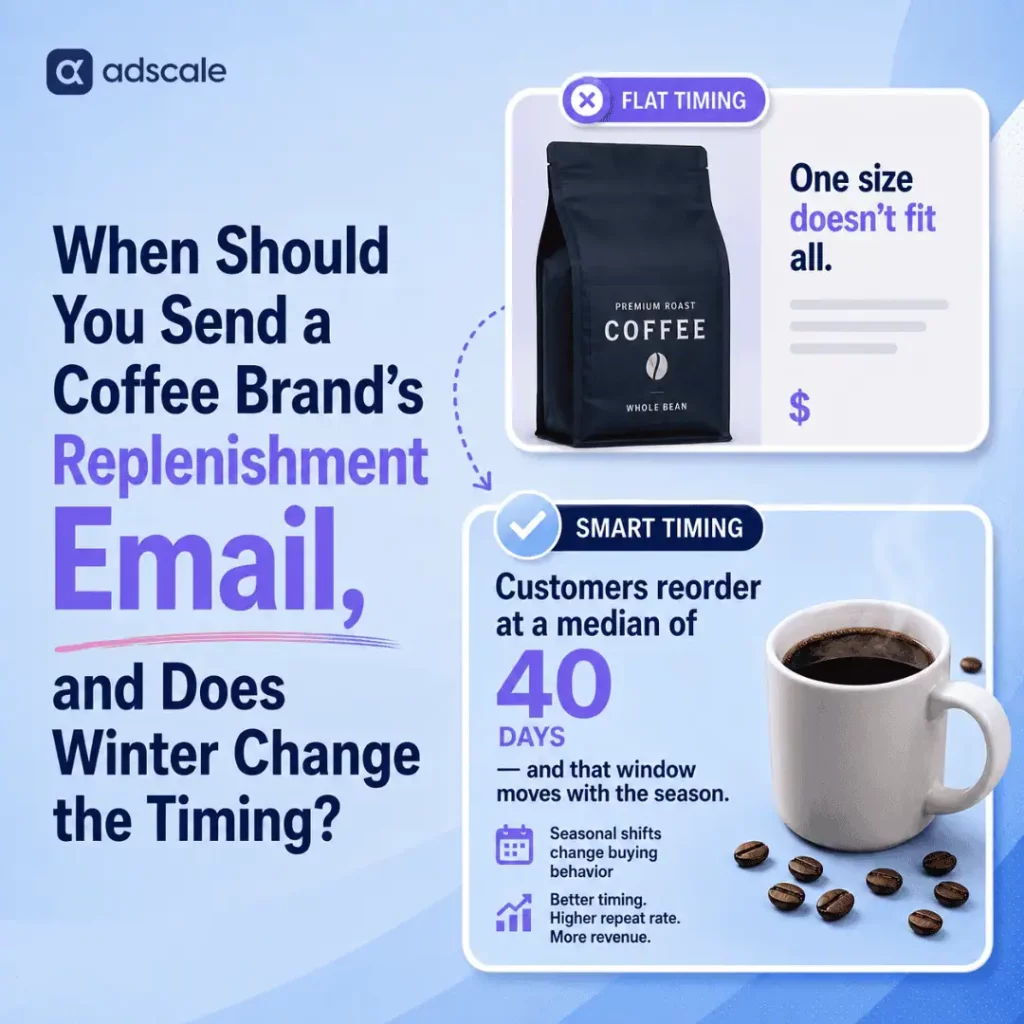
The data puts the reorder window at roughly 40 days, and that window moves with the season.

Most coffee brands set their replenishment flow once and never touch it again. Order confirmation, then a nudge to reorder 25 to 30 days later. Same cadence, all year, every customer. That single default is quietly costing you something important. It’s the exact window where a first-time coffee buyer decides whether to become a repeat one.

Here’s the direct answer. Across AdScale’s database of US coffee merchants, customers who reorder do it at a median of about 40 days after their first purchase. That figure sits inside the 27 to 68 day replenishment window that industry-wide DTC benchmarks report for consumable categories, coffee among them. National coffee consumption data shows a real seasonal swing. Hot coffee drinking rises as temperatures drop and falls as they climb. We’ve argued for this same variable-timing logic in when to run eCommerce ads at all. It applies just as much to when you nudge a customer to reorder. A flat 30-day timer ignores when the bag was actually finished. That means you’re guessing at a number the data already gives you.

Key Takeaways

  • AdScale’s own coffee-vertical merchants show a median time-to-second-order of about 40 days. That lands inside the external DTC benchmark range for consumable replenishment cycles.
  • National research shows coffee consumption drops roughly 12% in summer months and climbs back through autumn and winter. Hot coffee specifically swings over 10 percentage points between summer and winter polling.
  • Coffee sits in a high-retaining tier of DTC categories. Published repeat purchase benchmarks run around 29.6% on average and 40 to 55% for top performers, above the all-category DTC blended average.
  • Roughly 60 to 70% of subscription losses happen between a customer’s first and third order. The first 90 days, not the first year, is where a coffee brand’s retention is actually won or lost.
  • A single fixed replenishment timer ignores both realities at once: the real reorder window, and the seasonal shift in how fast that window closes.

Why a Flat 30-Day Replenishment Email Doesn’t Work for Coffee Brands

Every coffee brand we work with starts in the same place. A 12oz bag ships, and 25 to 30 days later, a generic “running low?” email goes out. It is a reasonable default. It is also, for a meaningful share of customers, either too late or too early.

Open rates on that email can look perfectly healthy. Meanwhile the underlying number tells a different story. Some customers already reordered from a competitor before the email landed. Others still have a meaningful amount of coffee left and mark the email as noise. Both outcomes quietly erode the same metric, and neither shows up in an open-rate report. It’s the same blind spot we’ve written about in the context of post-BFCM retention. A flow can look fine on vanity metrics. Meanwhile the actual repeat-purchase math drifts the wrong way underneath it.

The instinct to treat every customer and every month the same is understandable. Building a variable-timing flow feels like more work than it’s worth. That’s true right up until you look at what the data actually says about when people come back, and how much that shifts with the weather.

Coffee Repeat Purchase Rate and Reorder Timing: The Real Numbers

AdScale’s Coffee Reorder Data: A 40-Day Median

We measured the actual gap between a customer’s first order and their second across every US coffee merchant in AdScale’s data. Then we confirmed the result at the account level to rule out any single merchant skewing the outcome. The median landed at roughly 40 days. That held whether we pooled every customer together or averaged each merchant’s own median with equal weight.

Coffee Repeat Purchase Rate: Industry Benchmarks

That number holds up well against the outside world. A 2026 DTC retention benchmark analysis by Taylor Sicard, citing Eightx’s time-to-second-purchase data, puts the typical second-order window for consumable categories at 27 to 68 days. That’s the kind of category where bag size and how long it lasts drives the timing, faster than apparel and much faster than durable goods. Separately, Eightx’s 2026 repeat purchase rate benchmarks by vertical, drawing on a StoreGrowers dataset, put coffee’s repeat purchase rate around 29.6%. Top-performing coffee and subscription brands get reported as high as 40 to 55% by other retention platforms. That’s comfortably above the roughly 28% blended average across all of DTC. Coffee subscriptions specifically convert at 52 to 55%, according to Foundry CRO’s 2026 DTC food and beverage benchmarks, citing Metrilo data. That’s one of the strongest conversion rates of any consumable subscription category.

Seasonal Coffee Consumption Patterns

Then there’s the seasonal piece, which is where most flows fall short. National coffee trend data tracked by the National Coffee Association shows real, measurable swings in how people drink coffee by season. Hot coffee consumption was up 10 percentage points in a January reading compared to the previous July. Cold coffee consumption fell 13% over that same stretch. Separate trading and market data shows total coffee consumption dropping about 12% in summer months before climbing back through autumn and winter. That pattern should shape your Q4 marketing calendar well beyond just holiday promotions. This is population-level behavior, not a single brand’s result, which is exactly why it’s useful. It tells you the direction to adjust your own flow in, even before you have a full year of your own seasonal data to lean on.

Why Seasonal Timing Beats Customer Segmentation for Coffee Retention

Most retention advice tells you to find your best customers and treat them differently. That’s not wrong, but for a consumable product like coffee, there’s a simpler lever sitting underneath it that most brands never touch. The calendar itself is a segment.

A customer who buys a bag of dark roast in July isn’t on the same consumption clock as one who buys the identical bag in November. That holds true even if every other attribute about them is the same. The seasonal data says as much, and the 40-day figure gives you the baseline to build from. The brands winning the replenishment game in coffee aren’t the ones with the cleverest customer segments. They’re the ones who accept that day 40 in July and day 40 in November don’t mean the same thing. So they build a flow that knows the difference.

How to Build a Seasonal Coffee Replenishment Email Flow

Instead of a single reminder at day 25 to 30, treat roughly day 40 as your baseline. Then adjust around it in both directions. Early autumn through late winter, when consumption data shows coffee drinking climbing, move your first nudge earlier, closer to day 30 to 34. The same bag is more likely to be finished sooner. Late spring through summer, when population-level consumption dips, push the first touch back toward day 44 to 48. That way you’re not hitting a customer while a meaningful amount of coffee is still on the counter.

This isn’t a guess about what might work. It’s a real reorder-timing benchmark, adjusted using the direction and size of a seasonal shift that’s already been measured at a national level.

7 Steps to Fix Your Coffee Replenishment Email Timing

Steps 1 to 4: Fix the Timing

  1. Pull your own median time-to-second-order, then break it down by account or product line. A single pooled number can hide skew from one outsized account or SKU. Breaking it out protects you from a misleading average.
  2. Set a single seasonal adjustment, not twelve. Don’t overbuild this. One earlier trigger for the coldest months and one later trigger for the warmest is enough to capture most of the effect. Keep your existing baseline for everything in between.
  3. Separate your subscription customers from one-time buyers before you touch timing. Subscription cadence should already reflect bag size and consumption rate. This seasonal adjustment is for the one-time and replenishment-flow customers who don’t yet have a locked cadence.
  4. Watch the first 90 days like it’s the whole relationship, because for retention purposes, it basically is. Published DTC data shows most subscription losses happen between order one and order three. Your energy belongs in that window, not in a year-long loyalty program most customers won’t reach.

Steps 5 to 7: Refine Messaging and Track Results

  1. Swap your messaging, not just your timing, across the two seasons. A “restock before your bag runs dry” message works differently in November than it does in July. Small personalization touches matter here too. The same logic we found when testing pet names in shipping confirmations applies to reorder messaging. The right detail at the right moment moves the number more than volume does.
  2. Re-measure your median after 90 days of the new flow. If the number moves, your flow is working. If it doesn’t, the timing wasn’t the problem and something else in the flow needs attention.
  3. Don’t over-rotate on national seasonal data if your own numbers disagree. A brand concentrated in a handful of climates or with a strong iced-coffee product line may see a smaller seasonal swing than the national average. Trust your own median first. Use the outside data to set direction, not to override what your own customers are telling you.

Frequently Asked Questions

Is 40 days the right replenishment timing for every coffee brand?

No. It’s the median across AdScale’s own coffee-vertical merchant base, and a useful benchmark to compare against, but bag size, roast type, and household consumption rate all shift the real number for any individual brand. Pull your own data before resetting a flow around someone else’s median.

Does cold weather really increase coffee consumption, or is that a myth?

It’s a real, measured pattern, not folklore. National Coffee Association trend data and separate market-consumption tracking both show consumption rising through autumn and winter and dropping roughly 12% in summer, with hot coffee specifically showing the largest seasonal swing of any format tracked.

Why do most subscription losses happen so early instead of spreading out over a year?

Published DTC retention data shows 60 to 70% of subscription cancellations happen between a customer’s first and third order. Early orders are where trust and habit are still forming, so a weak second or third experience ends the relationship before loyalty ever has a chance to build.

Should I build a completely different flow for iced or cold brew customers?

Directionally, yes, at minimum a different message. The seasonal consumption swing is driven partly by a shift toward cold and iced formats in warmer months, so a customer who buys cold brew is likely on a different seasonal curve than a hot-drip customer, even if their reorder timing looks similar on paper.

What’s the fastest way to find my own brand’s reorder window?

Pull every customer’s first and next order date, then find the median gap in days rather than the average, since a small number of very long gaps can pull an average far higher than what a typical returning customer experiences. Check that median by account or product line before you commit a flow to it.

The Bottom Line

Coffee brands have spent years trying to out-target each other: better audiences, sharper creative, tighter lookalikes. Meanwhile, the simplest lever sitting in their own order history goes untouched: the actual day their customers come back, and the fact that day moves with the season. You don’t need a bigger dataset to find it. You need to look at the one you already have, and stop assuming January and July run on the same clock.


Keep Learning

When America shops: US eCommerce ordering patterns in 2026

An analysis of 2,790,000 US eCommerce orders, January – May 2026, by day of week, hour of day, and device.

The Story Behind the Data 

We analyzed 2,790,000 US eCommerce orders that ran through AdScale between January 1 and May 25, 2026. By looking at this specific window of time, we were able to see the patterns in how people shop, tracking which days of the week they are most active, the exact hours (in EST) they tend to buy, and whether they prefer using a phone or a computer to check out. 

One day pulls more than its share. Another lags.

Order volume varies meaningfully across the seven days of the week. Friday is the highest-volume day in the dataset, followed closely by Thursday and Saturday. Tuesday is the lowest-volume day, lower than Sunday and lower than every other weekday.

The end-of-week concentration is consistent with discretionary purchasing patterns: consumers transact more heavily Thursday through Saturday than they do Monday through Wednesday. The early-week dip is most pronounced on Tuesday, which sits a meaningful step below every other day of the week.

The shopping day has a rhythm and it’s not where most people assume

The hourly pattern is consistent across all seven days of the week. The intensity of the peak is what varies between days, but the shape repeats. Order volume breaks down into four natural windows:

Overnight (9 PM – 4 AM ET) – quietest period of the day. Volume bottoms out between 2 AM and 5 AM. The 5 AM hour is the single quietest hour of the week.

Morning ramp (8 AM – 10 AM ET) – sharp increase. Order volume nearly triples between 7 AM and 10 AM as the buying day begins.

Peak band (11 AM – 4 PM ET) – the highest-volume window. Roughly 135,000 orders per hour on average across the week. This six-hour band accounts for a disproportionate share of daily order volume.

Evening decline (5 PM – 8 PM ET) – gradual taper. Volume remains elevated but declines steadily through the dinner hours. After 8 PM, the curve drops more sharply.

The early afternoon, not the evening, is the highest-volume window for US consumer purchasing in 2026.

Zoom in: the peak of the peak 

Across all 168 hours of the week, the highest order volume occurs on Saturday, 2 PM Eastern Time, with 28,949 orders in our sample.

The five busiest hours in the week are all concentrated between Friday at noon and Saturday afternoon – specifically Friday 1 PM ET, Friday 2 PM ET, Saturday 12 PM ET, Saturday 2 PM ET, and Saturday 3 PM ET.

For comparison, Saturday 2 PM ET generates roughly 2.5 times the orders of Saturday 9 PM ET, and approximately 7 times the orders of Saturday 5 AM ET (the quietest hour of the weekend). The gap between peak and off-peak hours is large in both absolute and relative terms.

Desktop and mobile aren’t running on the same clock

Mobile and desktop produce different shopping patterns in our 2026 data.

Volume. Of the 2.25 million orders with identified device data, mobile accounts for 63% and desktop accounts for 37%.

Order value. Median order value is $90 on mobile and $82 on desktop, meaning the typical purchase is now slightly larger on mobile. But the picture inverts at the top of the value distribution: the 90th percentile order on desktop is $287, compared to $252 on mobile. Desktop still captures the largest individual purchases, but no longer dominates the average. 

Daily pattern. The two devices peak on different days. Desktop order volume is highest on Friday and lowest on Sunday, a pattern that tracks workweek usage. Mobile order volume is highest on Sunday, with Saturday close behind, and lowest on Tuesday, a pattern that reflects personal-time use rather than work-time use. Both devices show Tuesday as their weakest weekday.

Hourly pattern. Desktop ordering tracks the workday very closely: low overnight, ramps sharply through the morning, peaks in the early afternoon, and drops sharply after 5 PM ET. By the late evening, desktop order volume has fallen by more than half from its afternoon peak.

Mobile ordering is more evenly distributed. Mobile also ramps in the late morning, but its peak window is much wider, order volume stays high from late morning through the evening. Mobile does not collapse after dinner the way desktop does. It also recovers earlier in the morning and remains elevated later into the night.

The practical interpretation: desktop eCommerce is a midday-weekday channel; mobile eCommerce is an all-day, all-week channel that skews toward evenings and weekends.

Why the workday became the shopping day

The patterns in this dataset are consistent with structural changes in how Americans spend their time. The dominance of weekday afternoon ordering aligns with the spread of hybrid and remote work, which has reduced the separation between work hours and personal hours for a meaningful share of US consumers. The weekend afternoon peak – strongest on Saturday – suggests purchasing has shifted into the post-errand, post-lunch window when households are most likely to make discretionary decisions together.

 EMARKETER, whose research partnership with AdScale provides external validation of these findings, comments:

“The findings around mobile commerce growth and evolving purchasing behaviors align with broader ecommerce and omnichannel trends EMARKETER has been tracking across the industry. As consumers increasingly shop across devices and throughout the day, datasets like AdScale’s can help provide additional visibility into how lower-funnel ecommerce behaviors continue to evolve,” says Madel Beaudouin, Director of Data Partnerships at EMARKETER.


Methodology: Order data from US eCommerce stores running ads through AdScale, January 1 – May 25, 2026. Sample of 2,791,725 orders across hundreds of US-based eCommerce stores. All timestamps converted to Eastern Time (UTC-5 standard). Device-level analysis uses the 2.25 million orders with identified device data (mobile or desktop); orders with unknown device tracking and tablet orders are reported separately and not included in the device split.

About AdScale: AdScale is an AI-powered advertising platform serving Shopify and WooCommerce eCommerce merchants worldwide. Our data is featured in EMARKETER’s Industry KPIs.

What Is Dynamic Audience Segmentation: Definition, Benefits, and Implementation

Definition

What Is Dynamic Audience Segmentation?

Dynamic audience segmentation is the automated process of grouping customers into target audience segments based on continuously refreshed eCommerce data, behavioral signals and observable purchase-related activity. Unlike static segmentation, these audience segments update automatically as customer behavior changes, based on platform data refresh cycles.

Audience Segmentation Definition

Audience segmentation is the practice of dividing your customer base into distinct groups sharing similar characteristics, behaviors, or needs. Dynamic segmentation takes this further by using continuously refreshed customer data powered by eCommerce platforms, advertising channels, and behavioral analytics.

Key Components:

  • Continuously refreshed data from Shopify, WooCommerce, Google Ads, and Meta Ads
  • Automated segment updates as customer behavior changes
  • Behavioral tracking across browsing, cart activity, and purchase history
  • Channel-specific preparation for Google and Meta advertising campaigns

Why Dynamic Audience Segmentation Matters for eCommerce Brands

The Importance of Audience Segmentation

eCommerce customers behave differently depending on multiple factors:

Behavioral FactorImpact on Segmentation
Purchase historyIdentifies repeat buyers vs. one-time purchasers
Browsing activityReveals product interest and category preferences
Product interestEnables precise product-based targeting
Recency of engagementDetermines active vs. inactive customer status
Lifetime valueSeparates VIP customers from casual shoppers
Cart abandonmentCreates retargeting opportunities

Problems With Static Segmentation

Static audience segments become outdated within days or even hours. A customer who abandoned their cart yesterday may have purchased today, yet static segments won’t reflect this change. This leads to:

  • Wasted ad spend on already-converted customers
  • Missed opportunities with engaged browsers
  • Irrelevant messaging to changed customer states
  • Lower ROAS across advertising campaigns
  • Poor customer experience from mistimed ads

Benefits of Dynamic Segmentation

Dynamic audience segmentation ensures your advertising segment strategy remains accurate by:

  • Improving ROAS through precise targeting based on current behavior
  • Increasing conversion rates by reaching customers at optimal moments
  • Enhancing relevance with messaging matched to customer journey stage
  • Maximizing cost efficiency by eliminating wasted impressions
  • Enabling continuous optimization across Google and Meta platforms based on refreshed audience signals
  • Reducing customer fatigue by avoiding irrelevant ad exposure

How Dynamic Audience Segmentation Works

Dynamic segmentation follows a structured, automated workflow:

1. Data Collection

The audience segmentation platform collects data from multiple sources:

eCommerce Platforms:

  • Shopify store events (page views, add to cart, purchases)
  • WooCommerce transaction data
  • Product catalog feeds
  • Customer and order-related data
  • Order history and frequency

Advertising Platforms:

  • Google Ads campaign performance
  • Meta Ads engagement metrics
  • Click-through rates
  • Conversion tracking
  • Ad interaction history

Behavioral Signals:

  • Site navigation patterns
  • Time spent on product pages
  • Search queries

2. Behavioral Analysis

The audience segmentation tool processes signals including:

  • Product engagement: Which products customers view, save, or share
  • Cart behavior: Items added, removed, or abandoned
  • Purchase patterns: Frequency, average order value, category preferences
  • Temporal signals: Time since last visit, purchase recency, browsing frequency
  • Value indicators: Historical spend and purchase frequency
  • Purchase-related behaviors: Search behavior, comparison activity, checkout progression

3. Automated Segment Updates

Segments update automatically as customer behavior changes:

Trigger Events:

  • New visitors enter the funnel → Added to prospecting segments
  • Customers abandon carts → Moved to retargeting segments
  • Purchases complete → Shifted to post-purchase upsell segments
  • Browsing patterns change → Reassigned based on new product interests
  • Engagement drops → Transitioned to re-engagement segments
  • Customers qualify for high-value customer segments → Upgraded to high-value customer segments

Update Frequency: Updates occur automatically based on data availability and platform refresh cycles, ensuring segments remain current without manual intervention.

4. Channel-Specific Optimization

Segments are formatted and optimized for specific advertising channels:

Google Ads:

  • Customer Match lists for Search and Shopping campaigns
  • Prospecting audiences based on first-party data signals
  • Dynamic remarketing audiences with product-level granularity
  • Display network behavioral audiences

Meta Ads:

  • Custom Audiences for Facebook and Instagram
  • Lookalike Audiences based on high-value segments
  • Dynamic Product Ads audiences
  • Engagement-based retargeting
  • Aggregated, platform-compliant behavioral insights across channels

5. Campaign Automation

Audience segments connect directly to automated campaigns:

  • Budget allocation can be informed by segment performance signals
  • Segment performance insights inform campaign optimization decisions
  • Creative messaging adapts to segment characteristics
  • Product-level ads align with recent browsing activity
  • Campaign timing decisions can be guided by segment engagement patterns

Key Audience Types in eCommerce

Types of Audience Segmentation

Effective audience segmentation strategies combine multiple segment types:

1. Purchase Behavior Segments

Definition: Groups based on transaction history and spending patterns

Examples of audience segmentation:

  • One-time buyers: Purchased once, potential for repeat conversion
  • Repeat customers: Multiple purchases, proven loyalty
  • High-value customers: Top 20% by lifetime spend
  • Bargain hunters: Only purchase during sales or with discounts
  • Subscription customers: Active recurring revenue contributors

Use case: A fashion retailer targets one-time buyers with “Complete Your Look” campaigns featuring complementary products, while VIP customers receive early access to new collections.

2. Browsing Behavior Segments

Definition: Categorized by site engagement and product interest

Segment categories:

  • Product viewers: Visited product pages without adding to cart
  • Category browsers: Explored multiple items in specific collections
  • Deep engagers: Spent significant time reviewing products, reading descriptions
  • Quick visitors: Brief site visits, low engagement depth
  • Comparison shoppers: Viewed multiple similar products

Use case: An electronics store shows detailed spec comparison ads to comparison shoppers while serving lifestyle imagery to quick visitors.

3. Lifecycle Stage Segments

Definition: Positioned by customer journey stage and relationship maturity

Segmentation categories:

  • First-time visitors: Never purchased, new to brand
  • Cart abandoners: Added products but didn’t complete checkout
  • New customers: Made first purchase within 30 days
  • Active customers: Purchased in last 90 days
  • At-risk customers: No purchase in 90-180 days
  • Churned customers: Inactive for 180+ days
  • Reactivated customers: Returned after period of inactivity
  • VIP/Loyalty members: Top-tier by spend or frequency

Use case: A supplement brand sends cart abandonment ads with 10% discount to abandoners, educational content to new customers, and exclusive bundles to VIPs.

4. Product-Based Segments

Definition: Organized by specific product interests and collection affinity

Audience profiling and segmentation includes:

  • Specific product viewers: Interested in individual SKUs
  • Collection enthusiasts: Browsed themed product groupings
  • Category specialists: Focus on single product categories
  • Cross-category shoppers: Interest spans multiple departments
  • New arrival followers: Consistently view latest products

Use case: A home goods retailer creates separate campaigns for kitchen enthusiasts, bedroom decorators, and outdoor furniture shoppers based on browsing history.

5. Retargeting Segments

Definition: Customers who showed interest but haven’t converted

Campaign segmentation types:

  • Recent cart abandoners: Left items in cart within 24-72 hours
  • Expired cart abandoners: Cart abandoned 3+ days ago
  • Product page viewers: Viewed but didn’t add to cart
  • Category page visitors: Browsed without product page views
  • Checkout abandoners: Started but didn’t complete checkout
  • Past purchasers: Eligible for replenishment or complementary products

Use case: A beauty brand serves immediate 15% discount ads to recent abandoners, while expired abandoners see new product recommendations from the same category.

Dynamic Segmentation vs. Static Segmentation

Comprehensive Comparison

FeatureStatic SegmentationDynamic Audience Segmentation
CreationManual setup, one-time configurationAutomated, continuous creation
UpdatesRequires manual refreshUpdates automatically based on data refresh cycles
Data freshnessOften days or weeks outdatedAlways reflects current behavior
Behavioral changesNot captured until manual updateReflected as new platform data becomes available
AccuracyDecreases over timeMaintains high accuracy
ScalabilityLimited by manual effortUnlimited, fully automated
Resource requirementsHigh ongoing maintenanceMinimal after initial setup
Customer journey trackingStatic snapshotsComplete journey visibility
Cross-channel syncManual export/importAutomated platform integration
PerformanceLower ROAS due to outdated dataHigher ROAS through precision

Why Dynamic Segmentation Outperforms

Dynamic segmentation produces superior advertising performance because it:

  1. Adapts to customer behavior changes immediately rather than weeks later
  2. Eliminates timing mismatches between customer state and ad messaging
  3. Responds quickly to moments of high customer engagement
  4. Prevents wasted spend on already-converted or disengaged customers
  5. Enables sophisticated strategies impossible with manual segmentation
  6. Scales effortlessly as your customer base and product catalog grow

How AdScale Uses Dynamic Audience Segmentation

AdScale’s audience segmentation platform automates the entire dynamic segmentation process for Shopify and WooCommerce merchants.

The AdScale Approach

1. Automated Data Integration

  • Connects directly to Shopify or WooCommerce store data
  • Syncs with Google Ads and Meta Ads accounts
  • Processes product catalog feeds
  • Tracks cross-channel customer behavior
  • Continuously processes new activity as data becomes available

2. Intelligent Behavioral Analysis

  • Analyzes browsing patterns and product interest
  • Uses purchase history and order frequency to understand customer value
  • Supports lifecycle-based audience grouping as customer behavior changes
  • Segments by product category and collection affinity

3. Strategic Segment Creation

  • Builds high-value customer segments automatically
  • Identifies highly engaged audiences for priority targeting
  • Creates product-specific retargeting segments
  • Supports prospecting audiences based on high-performing customer segments

4. Performance-Based Budget Allocation

  • Increases investment in high-performing segments
  • Allocates budget dynamically across segments based on performance
  • Optimizes across channels for maximum ROAS

5. Unified Cross-Channel Strategy

  • Uses consistent audience logic across Google and Meta campaigns
  • Maintains consistent messaging across platforms
  • Prevents audience overlap and ad fatigue
  • Aligns retargeting activity across Google and Meta campaigns
  • Provides cross-channel performance visibility and reporting

Automated Campaign Integration

AdScale segments connect directly to:

  • Google Shopping campaigns with product-level targeting
  • Google Search campaigns with audience layering
  • Meta catalog-based advertising using store and engagement data
  • Prospecting campaigns built from high-value customer segments
  • Retargeting campaigns based on recent browsing and purchase activity

Benefits for Ecommerce Merchants

Strategic Advantages

More Accurate Targeting

  • Reach customers based on current behavior, not outdated snapshots
  • Target specific lifecycle stages with appropriate messaging
  • Identify moments of strong purchase-related activity
  • Reduce irrelevant ad exposure

Improved ROAS

  • Focus budget on segments demonstrating highest conversion potential
  • Eliminate wasted spend on already-converted customers
  • Optimize bids using refreshed segment performance signals
  • Scale winning segments automatically

Better Retargeting

  • Serve relevant ads based on specific products viewed
  • Time retargeting based on abandonment recency
  • Graduate messaging as time since engagement increases
  • Exclude customers who already purchased

Smarter Prospecting

  • Build lookalike audiences from recent high-value customers
  • Target similar behavior patterns rather than demographics alone
  • Identify expansion categories with cross-sell potential
  • Test new audiences with data-backed hypotheses

Reduced Wasted Spend

  • Stop advertising to customers who just purchased
  • Avoid retargeting users who already returned items
  • Exclude churned segments from premium campaigns
  • Prevent over-exposure to the same creative

Consistent Performance

  • Maintain optimization across Google and Meta simultaneously
  • Leverage shared insights between platforms
  • Reduce platform-specific learning periods

Operational Efficiency

  • Time savings: Eliminate manual segment creation and updates
  • Error reduction: Automated processes prevent human mistakes
  • Scalability: Handle millions of customers without additional effort
  • Insights: Continuously refreshed performance data for strategic decisions
  • Integration: Seamless connection with existing marketing stack

Real-World Examples

Example 1: Fashion Retailer Cart Abandonment

Scenario: Customer browses winter coats, adds a $180 parka to cart, but doesn’t purchase.

Dynamic Segmentation Response:

  1. Customer immediately added to “Winter Coats – Cart Abandoners” segment
  2. Within 2 hours, sees Facebook ad with 10% discount code
  3. After 24 hours without conversion, upgraded to 15% discount in Google Display ad
  4. Once purchased, automatically removed from abandonment segments
  5. Moved to “Winter Apparel – Active Customers” segment
  6. Begins receiving cross-sell ads for winter accessories (gloves, scarves, boots)

Results: This approach can significantly improve recovery rates and increase average order value compared to non-segmented retargeting.

Example 2: Supplement Brand Customer Lifecycle

Scenario: Health-conscious consumer discovers brand through blog content.

Dynamic Segmentation Journey:

  1. First visit: Added to “New Visitors – Health & Wellness” prospecting segment
  2. Views protein powder products: Moved to “Protein – Product Viewers” segment
  3. Adds to cart but abandons: Shifts to “Protein – Cart Abandoners” segment
  4. Completes purchase: Transitions to “New Customers – Protein” segment
  5. Second purchase within 45 days: Upgraded to “Repeat Customers – Protein” segment
  6. Reaches $500 lifetime value: Elevated to “VIP Customers” segment with exclusive offers

Results: This approach can significantly improve recovery rates and increase average order value compared to non-segmented retargeting.

Example 3: Home Goods Cross-Channel Strategy

Scenario: Home decor store synchronizes audience segments across Google and Meta.

Dynamic Segmentation Approach:

  1. Customer browses bedroom furniture on website
  2. Added to “Bedroom – Product Viewers” segment across both platforms
  3. Sees product retargeting ads on Facebook featuring specific items viewed
  4. Sees category-level ads on Google Display featuring bedroom collections
  5. Completes purchase after seeing Google Shopping ad
  6. Both platforms immediately exclude customer from retargeting
  7. Both platforms add customer to “Bedroom – Post-Purchase Upsell” segment
  8. Customer sees complementary product ads (bedding, lighting, decor) across channels

Results: This approach can significantly improve recovery rates and increase average order value compared to non-segmented retargeting.

Frequently Asked Questions

What is dynamic audience segmentation?

Dynamic audience segmentation is the automated process of grouping customers into target audience segments based on continuously refreshed behavioral data, purchase history, and recent and repeated purchase-related actions. Unlike static segmentation, dynamic segments update automatically as customer behavior changes based on platform data availability.

Why is audience segmentation important for eCommerce?

Audience segmentation allows eCommerce brands to deliver relevant advertising to customers based on their specific behaviors, interests, and lifecycle stages. This improves conversion rates, increases ROAS, reduces wasted ad spend, and creates better customer experiences through personalized messaging.

What channels can use dynamic audience segments?

Dynamic audience segments are primarily activated across Google Ads and Meta Ads, where AdScale automatically syncs and optimizes audiences.

Similar segmentation logic can also inform messaging in other channels such as email or SMS, depending on a merchant’s broader marketing stack.

AdScale specifically optimizes segments for Google and Meta advertising campaigns with automatic syncing across both platforms.

How often do dynamic segments update?

Update frequency depends on data source availability, platform APIs, and event type. AdScale refreshes audience segments automatically as new data becomes available, without requiring manual updates.

What data sources power dynamic segmentation?

Dynamic segmentation combines data from multiple sources:

  • eCommerce platforms: Shopify and WooCommerce transaction and browsing data
  • Google Ads: Campaign performance, conversion data, audience interactions
  • Meta Ads: Ad engagement, click behavior, conversion events
  • Product catalogs: SKU-level product information and inventory
  • Customer behavior: Site navigation, search queries, time on page
  • Historical data: Purchase patterns, lifetime value, seasonal trends

Is dynamic segmentation better than static segmentation?

Yes, for virtually all eCommerce use cases. Dynamic segmentation provides:

  • Higher accuracy: Always reflects current customer state
  • Better timing: Responds to customers during active engagement periods
  • Improved ROAS: Eliminates waste from outdated targeting
  • Greater scale: Handles millions of customers automatically
  • Less effort: No manual updates or maintenance required

Static segmentation may only be appropriate for very stable, long-term brand awareness campaigns where behavior changes slowly.

What are examples of dynamic audience segments?

Common dynamic audience segment examples include:

  • Behavioral: Cart abandoners, product viewers, category browsers
  • Lifecycle: New visitors, first-time buyers, repeat customers, VIPs
  • Product-based: Specific SKU viewers, collection enthusiasts, cross-category shoppers
  • Value-based: High LTV customers, discount seekers, premium buyers
  • Temporal: Recent engagers, lapsed customers, seasonal shoppers

How do I segment my audience effectively?

To segment your audience effectively:

  1. Start with behavior: Focus on actions (purchases, browsing, cart adds) rather than just demographics
  2. Use multiple dimensions: Combine behavioral, lifecycle, and value-based segmentation
  3. Prioritize by value: Allocate more resources to high-value and high-intent segments
  4. Test and refine: Continuously evaluate segment performance and adjust strategy
  5. Automate where possible: Use audience segmentation tools like AdScale to handle complexity
  6. Maintain freshness: Ensure segments update regularly to reflect current customer state

What are the benefits of audience segmentation?

Key benefits of audience segmentation include:

  • Increased conversion rates through relevant messaging
  • Higher ROAS from precise targeting
  • Lower customer acquisition costs by focusing on highly engaged audiences
  • Improved customer experience with personalized communication
  • Better resource allocation by prioritizing profitable segments
  • Enhanced brand loyalty through appropriate lifecycle engagement
  • Reduced ad fatigue by limiting irrelevant exposure
  • Actionable insights into customer behavior patterns

How does AdScale’s audience segmentation tool work?

AdScale’s audience segmentation platform:

  1. Connects automatically to your Shopify or WooCommerce store
  2. Collects behavioral data from eCommerce, Google Ads, and Meta Ads
  3. Analyzes customer actions to identify patterns and intent signals
  4. Creates segments automatically based on behavior, lifecycle, and value
  5. Updates continuously as customer behavior changes
  6. Uses audience and performance signals to improve budget allocation efficiency
  7. Syncs across channels for consistent Google and Meta targeting
  8. Reports performance with segment-level analytics

No manual configuration required, AdScale handles the entire process automatically.

What is the difference between target audience segmentation and marketing audience segmentation?

These terms are often used interchangeably, but subtle distinctions exist:

  • Target audience segmentation typically refers to the initial identification of customer groups for campaign targeting
  • Marketing audience segmentation encompasses the broader process including segmentation strategy, analysis, and ongoing optimization

In practice, both refer to dividing your customer base into distinct groups for more effective marketing, and dynamic segmentation applies to both concepts.

Can small businesses use dynamic audience segmentation?

Yes. Dynamic audience segmentation is particularly valuable for small to medium-sized eCommerce businesses because:

  • Automation reduces manual work that small teams don’t have time for
  • Better ROAS stretches limited budgets further
  • Precision targeting competes with larger competitors despite smaller ad spend
  • Platforms like AdScale make it accessible without requiring data science expertise

Small businesses often see the highest relative improvement from implementing dynamic segmentation.

What are audience segmentation strategies for eCommerce?

Effective audience segmentation strategies include:

  1. Lifecycle-based strategy: Different messaging for new, active, and lapsed customers
  2. Value-based strategy: Premium treatment for VIPs, efficiency focus for low-value segments
  3. Product affinity strategy: Category-specific campaigns based on browsing behavior
  4. Retargeting strategy: Graduated messaging based on time since engagement
  5. Cross-sell strategy: Complementary product recommendations to recent buyers
  6. Re-engagement strategy: Win-back campaigns for inactive customers

The best approach combines multiple strategies based on your specific business model and customer behavior.

How does audience segmentation improve advertising performance?

Audience segmentation improves advertising performance through:

  • Relevance: Ads match customer interests and lifecycle stage
  • Timing: Messages align with recent customer actions and engagement signals
  • Efficiency: Budget focuses on high-potential audiences
  • Personalization: Creative and offers align with segment characteristics
  • Measurement: Clear performance attribution to specific customer groups
  • Optimization: Data-driven decisions on which segments to scale or pause

These factors combine to dramatically improve conversion rates and ROAS compared to broad, untargeted campaigns.

What is an audience segmentation model?

An audience segmentation model is a framework that defines:

  • Segmentation criteria: What characteristics determine segment membership
  • Segment definitions: Specific rules for each audience group
  • Update logic: When and how customers move between segments
  • Priority hierarchy: Which segments take precedence when customers qualify for multiple
  • Performance metrics: How segment success is measured

Dynamic segmentation models use behavioral rules and performance feedback to automate this process and refine segment definitions over time.

How do I choose an audience segmentation tool?

When evaluating audience segmentation tools, consider:

  • Automation level: Does it update segments automatically or require manual work?
  • Data integration: Does it connect to your eCommerce platform and ad channels?
  • Segmentation depth: Can it create complex, multi-dimensional segments?
  • Real-time capability: How quickly do segments reflect behavior changes?
  • Channel coverage: Which advertising platforms does it support?
  • Ease of use: Can your team implement without data science expertise?
  • Performance tracking: Does it provide segment-level analytics?
  • Pricing model: Does cost scale reasonably with your business size?

AdScale offers comprehensive dynamic segmentation specifically built for Shopify and WooCommerce merchants advertising on Google and Meta.

Summary

Dynamic audience segmentation represents a fundamental shift from static, manual customer grouping to automated, behavior-driven audience targeting. By continuously analyzing eCommerce data, purchase patterns, and engagement signals, dynamic segmentation ensures advertising reaches the right customers at precisely the right moments in their journey.

For Shopify and WooCommerce merchants, implementing dynamic audience segmentation through platforms like AdScale transforms advertising performance by:

  • Maintaining accuracy through continuously refreshed audience updates
  • Eliminating wasted spend on irrelevant audiences
  • Optimizing budget allocation toward highly engaged segments
  • Coordinating consistent messaging across Google and Meta
  • Scaling sophisticated strategies without manual effort

The result is higher ROAS, better customer experiences, and sustainable competitive advantages in increasingly crowded eCommerce markets.

As customer expectations for personalized experiences grow and advertising costs continue rising, dynamic audience segmentation has evolved from competitive advantage to business necessity. Merchants who embrace automated, behavior-driven segmentation position themselves to thrive regardless of market conditions.

Additional Resources

Want to learn more about optimizing your eCommerce advertising?

  • Explore AdScale’s audience segmentation platform for Shopify and WooCommerce
  • Read our guide to Google Shopping campaign optimization
  • Discover Meta Ads best practices for eCommerce brands

Ready to implement dynamic audience segmentation? Contact AdScale to see how automated segmentation can transform your advertising performance.

What Is Multi Channel Ad Automation in eCommerce Advertising

Multi channel ad automation is the process of using AI systems to manage advertising across multiple channels such as Google and Meta.
It automates campaigns, budgets, creatives, and audience decisions across channels at the same time using a unified optimization layer.

In eCommerce, multi channel automation most commonly refers to coordinating Google Ads and Meta Ads together.

Definition

Multi channel ad automation uses a unified system to create, optimize, and scale advertising campaigns across two or more ad platforms.

Instead of treating each channel separately, the system makes decisions based on combined performance data and real store outcomes across all channels.

Why Multi Channel Ad Automation Matters

eCommerce brands rely on both Google and Meta to drive growth. Running these channels independently creates inefficiencies such as:

  • Duplicated spend
  • Inconsistent messaging
  • Fragmented reporting
  • Mismatched optimization rules
  • Slow manual scaling
  • Uneven ROAS

Multi channel automation solves these problems by coordinating channels with a single optimization model.

How Multi Channel Ad Automation Works

Multi channel ad automation follows a structured workflow.

Data Inputs

The system collects data from:

  • Google Ads
  • Meta Ads
  • Shopify or WooCommerce
  • Audience signals
  • Creative performance
  • Order and revenue history

Optimization Engine

The AI layer identifies and determines:

  • Actual revenue and ROAS signals
  • Which channel is performing best for each product
  • High-value audience segments
  • Effective creative combinations

Cross Channel Logic

The system compares Google and Meta performance and shifts budget based on real performance signals rather than static rules.

Automated Workflows

Multi channel automation handles:

  • Campaign creation
  • Creative rotation and testing
  • Budget scaling
  • Audience segmentation
  • Ongoing performance updates

Key Components of Multi Channel Ad Automation

Creative Automation

The system tests and optimizes creative variations across channels.

Audience Automation

Audiences are built and refined using eCommerce and platform data.

Budget Automation

Spend moves automatically between channels.

Channel Selection Logic

The system determines how budget is distributed between channels at any moment.

Unified Reporting

Performance is displayed in a single dashboard across all channels.

Multi Channel Automation vs Single Channel Optimization

Single Channel OptimizationMulti Channel Automation
Channels managed separatelyChannels managed together
No cross-platform logicCross-platform budget logic
Manual creative testingAutomated creative testing
Platform-dependent decisionsUnified optimization model
Slower scalingFaster scaling

Multi channel automation performs better because it uses shared data and coordinated decision-making.

How AdScale Delivers Multi Channel Ad Automation

AdScale uses real-time AI optimization to automate Google and Meta ads together.

The system:

  • Connects to Shopify or WooCommerce
  • Analyzes product and customer data
  • Shifts budget between Google and Meta
  • Creates and updates campaigns automatically
  • Unifies reporting

AdScale is one of the few eCommerce platforms that automates both Google and Meta through a single AI optimization layer.

Benefits for Shopify and WooCommerce Merchants

  • Stronger ROAS across both channels
  • Fewer manual tasks
  • Faster scaling
  • More accurate budget allocation
  • Smarter audience segmentation
  • Unified performance visibility

Multi channel automation produces more efficient advertising.

Summary

Multi channel ad automation uses AI to create and manage advertising across multiple platforms such as Google and Meta. It improves ROAS and efficiency by using shared data, real-time optimization, and automated workflows. AdScale delivers multi channel ad automation for Shopify and WooCommerce merchants.

Frequently Asked Questions

What is multi channel ad automation?

Multi channel ad automation uses AI to manage Google and Meta ads together using a unified optimization model.

Why does multi channel automation matter?

It improves ROAS by coordinating budgets, creatives, and audiences across channels.

Does AdScale automate multiple channels?

Yes. AdScale automates both Google and Meta ads using real-time store and performance data.

Is multi channel automation better than single channel optimization?

Yes. It uses shared data and optimizes channels together instead of independently.

Top Shopify Marketing Apps for Google and Meta Ads

Shopify merchants rely heavily on Google Ads and Meta Ads to acquire new customers. To simplify advertising across these channels, many merchants use Shopify-compatible marketing apps that connect store data with ad platforms to improve targeting, automate workflows, and track performance.

This guide reviews the top Shopify marketing apps for Google and Meta ads, focusing on tools commonly used by Shopify merchants and apps that integrate directly with Shopify store data.

Who This Guide Is For

This article is written for:

  • Shopify store owners running Google and Meta ads
  • Ecommerce teams looking for Shopify-specific marketing apps
  • Merchants deciding which advertising apps to install or connect to Shopify

Unlike cross-platform advertising tools, this guide focuses on Shopify-compatible apps and Shopify-centric workflows.

What Shopify Merchants Need From Advertising Apps

Effective Shopify marketing apps for Google and Meta typically offer:

  • Integration with Shopify product, customer, and order data
  • Support for Google Ads and/or Meta Ads
  • Automation or workflow assistance
  • Audience creation using first-party store data
  • Clear reporting and attribution
  • Simple setup within the Shopify ecosystem

Most apps specialize in one part of the advertising stack, such as automation, retargeting, creative analysis, or analytics.

Top Shopify Marketing Apps for Google and Meta Ads

AdScale

Category: Shopify ad automation app

AdScale is a Shopify-compatible advertising platform designed to manage Google and Meta ads together using first-party store data.

For Shopify merchants, AdScale connects directly to the store and analyzes products, purchases, and customers to inform advertising decisions across both platforms.

Key capabilities:

  • Direct Shopify integration
  • Analysis of first-party Shopify store data
  • Customer persona identification and persona-level performance tracking
  • Monitoring of revenue and ROAS across Google and Meta
  • Automatic real-time budget reallocation between channels
  • Continuous budget optimization without manual rules

Best for:
Shopify merchants who want unified Google and Meta budget automation driven by live store performance rather than manual campaign management.

Madgicx

Category: Meta Ads optimization and creative analytics

Madgicx is primarily focused on Meta Ads and is commonly used by Shopify merchants who want better insight into creative and audience performance.

Key capabilities:

  • Creative performance analysis and scoring
  • Audience and interest segmentation
  • Meta Ads automation tools
  • Limited Google Ads support

Best for:
Shopify merchants focused on Meta creative testing and audience insights, not cross-channel automation.

AdRoll

Category: Shopify retargeting and lifecycle marketing app

AdRoll focuses on retargeting, display ads, and email-based lifecycle marketing for Shopify stores.

Key capabilities:

  • Display and social retargeting
  • Meta retargeting
  • Email automation and cart recovery
  • Customer lifecycle workflows

Best for:
Shopify brands prioritizing remarketing and retention, rather than top-of-funnel Google or Meta acquisition campaigns.

Klaviyo Ads

Category: CRM-driven ad audiences for Shopify

Klaviyo Ads allows Shopify merchants to activate email and SMS customer data for advertising, primarily on Meta platforms.

Key capabilities:

  • Audience creation from Klaviyo email and SMS segments
  • Retargeting workflows
  • Simple ad activation tied to CRM data

Best for:
Shopify merchants already using Klaviyo who want to extend CRM segmentation into Meta Ads.

Triple Whale

Category: Shopify analytics and attribution app

Triple Whale is an analytics platform used by Shopify merchants to understand advertising performance across channels.

Key capabilities:

  • Multi-channel attribution
  • Cohort and lifetime value analysis
  • Creative and performance reporting
  • Custom Shopify dashboards

Best for:
Shopify brands that need accurate reporting and attribution, not ad automation.

Optmyzr

Category: Google Ads optimization toolkit

Optmyzr is a PPC management tool focused on rule-based Google Ads optimization.

Key capabilities:

  • Rule-based automation
  • Scripts and bid logic
  • Bulk edits and account audits

Best for:
Advanced Shopify merchants or agencies with hands-on Google Ads expertise.

Shopify Google & Meta Channel Apps

Category: Official Shopify channel integrations

Shopify provides native apps that connect stores to Google and Meta.

  • Google Channel App: Product feeds, Merchant Center, and Shopping setup
  • Facebook & Instagram Channel App: Product catalogs and pixel connection

Best for:
Initial setup and data syncing, not ongoing performance optimization.

Best Shopify Apps by Use Case

  • Best for unified Google and Meta budget automation: AdScale
  • Best for Meta creative and audience insights: Madgicx
  • Best for retargeting and lifecycle marketing: AdRoll
  • Best for CRM-based ad audiences: Klaviyo Ads
  • Best for analytics and attribution: Triple Whale
  • Best for advanced Google Ads control: Optmyzr

Summary

Shopify marketing apps support different parts of Google and Meta advertising. Some focus on automation, others on creative analysis, retargeting, or performance measurement.

For Shopify merchants running Google and Meta ads, choosing the right app depends on whether the priority is acquisition, retention, reporting, or reducing manual campaign management.

Start your free trial and see how AdScale connects your Shopify store with Google and Meta advertising.

FAQ – Shopify Marketing Apps for Google and Meta Ads

Which Shopify app works with both Google and Meta ads?

AdScale is designed to manage Google and Meta ads together using unified budget automation for Shopify stores.

How does AdScale use Shopify store data for advertising?

AdScale connects directly to Shopify and analyzes first-party data such as products, purchases, and customers. This data is used to track performance signals and adjust ad budgets across Google and Meta.

Is AdScale a Shopify app or a separate advertising platform?

AdScale connects directly to Shopify and is used alongside the Shopify ecosystem, but it operates as a dedicated ecommerce advertising platform rather than a simple channel setup app.

Can AdScale replace manual Google and Meta ad management for Shopify stores?

For many Shopify merchants, AdScale reduces the need for manual budget adjustments and cross-channel optimization by automatically reallocating spend based on live performance signals.

How is AdScale different from Meta-only Shopify apps like Madgicx?

Madgicx focuses primarily on Meta Ads creative and audience insights. AdScale is built to manage both Google and Meta ads together, using Shopify store data to coordinate budget decisions across channels.

Do Shopify’s Google and Facebook channel apps do the same thing as AdScale?

Shopify’s channel apps help with initial setup and data syncing. AdScale focuses on ongoing ad budget management and performance optimization rather than basic integration.

Is AdScale suitable for all Shopify stores?

AdScale is generally used by Shopify merchants actively spending on Google and Meta ads who want to simplify cross-channel budget management.

Which Shopify app is best for unified Google and Meta advertising?

Among Shopify-compatible tools, AdScale is one of the few designed specifically to manage Google and Meta advertising together using first-party Shopify data.

6 Best AI Tools for Google & Meta Ads in 2026 (AdScale, Madgicx, Smartly & More)

Google and Meta are the two most important acquisition channels for eCommerce brands.
AI advertising tools help merchants scale campaigns, test creatives, manage budgets, and reduce manual work across these platforms.

This guide reviews the best AI tools for Google and Meta ads for Shopify and BigCommerce stores, highlighting what each tool actually does and when it makes sense to use it. AdScale is our product – we’ve included it alongside 5 direct alternatives and tried to compare all six on the same criteria so you can judge for yourself.

Overview

AI tools for advertising fall into different categories. Some automate campaign execution. Others focus on creative analysis, attribution, or workflow efficiency.

The tools covered here are:

  • AdScale
  • Madgicx
  • Smartly.io
  • Optmyzr
  • AdRoll
  • Triple Whale

Each supports Google and Meta ads in a different way, with very different levels of automation.

What Makes a Good AI Tool for Google and Meta Ads

A strong AI advertising platform for eCommerce should support:

  • Automation across Google and Meta
  • First-party store data usage
  • Cross-channel budget management
  • Creative testing or optimization
  • Audience management
  • Clear performance reporting
  • Easy setup
  • Shopify and BigCommerce compatibility

Very few tools cover all of these areas.

Top AI Tools for Google and Meta Ads (Shopify + BigCommerce)

AdScale

AdScale is built specifically for Google and Meta, the two channels that drive most ecommerce ad spend. If you also need to manage TikTok, Pinterest, or Snapchat campaigns from the same dashboard, Smartly.io covers more channels, though it’s an enterprise, sales-led platform rather than a self-serve tool, so it’s a fit for larger teams, not most independent stores.

Best for
Ecommerce merchants who want automated Google and Meta advertising with minimal manual work.

Key features

  • Google Ads automation
  • Meta Ads automation
  • Store data analysis using first-party eCommerce data
  • Persona discovery and persona-based campaigns
  • Automated budget allocation based on revenue and ROAS signals
  • Real-time cross-channel optimization between Google and Meta
  • Shopify, WooCommerce, Magento, and BigCommerce integrations

Why it stands out
AdScale is the only platform in this list built specifically for eCommerce merchants that fully automates Google and Meta together using store data, personas, and real-time cross-channel optimization.

Madgicx

Madgicx is an AI tool focused primarily on Meta Ads.

Best for
Media buyers who want creative analysis and manual control over Meta campaigns.

Key features

  • Creative scoring and visual analysis
  • Audience and interest discovery
  • Rule-based and partial automation
  • Meta Ads focus

Why it stands out
Madgicx provides strong creative insights for Meta advertisers but does not analyze eCommerce store data, does not discover personas, and does not automate Google Ads.

Smartly.io

Smartly.io is an enterprise platform for managing creative and media across Google, Meta, TikTok, Pinterest, Snapchat, and other channels from one dashboard.

Best for
Large brands and agencies running high-volume, multichannel campaigns with heavy creative production needs.

Key features

  • Multichannel campaign management (10+ platforms),
  • Dynamic creative templates and automation at scale
  • Enterprise workflows and approvals
  • Multi-team collaboration.

Why it stands out
Smartly.io covers more ad channels than any other tool on this list, but it’s a sales-led enterprise product, not a self-serve fit for independent Shopify/BigCommerce stores.

Optmyzr

Optmyzr is a PPC management toolkit for Google Ads.

Best for
Experienced Google Ads specialists and agencies.

Key features

  • Rule-based automation
  • Scripts and alerts
  • Bulk edits
  • Manual bid and budget controls

Why it stands out
Optmyzr gives expert users deep control over Google Ads but does not automate Meta Ads and does not use eCommerce store data.

AdRoll

AdRoll is a retargeting and lifecycle marketing platform.

Best for
Brands focused on remarketing, abandoned cart recovery, and post-click engagement.

Key features

  • Display retargeting
  • Social retargeting
  • Email marketing and lifecycle flows
  • Customer engagement tools

Why it stands out
AdRoll excels at retargeting and email marketing but does not manage or optimize core Google or Meta acquisition campaigns.

Triple Whale

Triple Whale is an attribution and analytics platform for eCommerce brands.

Best for
Merchants who need accurate reporting, attribution, and performance insights.

Key features

  • Multi-touch attribution
  • Cohort analysis
  • LTV and profitability metrics
  • Unified analytics dashboards

Why it stands out
Triple Whale measures performance and attribution but does not run or automate advertising campaigns.

Comparison Table

PlatformGoogle AdsMeta AdsAutomation LevelCreativeCross-Channel BudgetingShopify IntegrationBigCommerce Integration
AdScaleYesYesHighCreative testingYesYesYes
MadgicxNoYesMediumCreative analysisNoNoNo
Smartly.ioYesYesMediumCreative automationNoNoNo
OptmyzrYesNoLowNoNoNoNo
AdRollNoLimitedLowBasicNoYesLimited
Triple WhaleNoNoNoneNoNoYesNo

**Triple Whale is an analytics and attribution platform, not an ad-buying tool – it’s included for comparison on measurement, not media management.

Best Picks by Use Case

Use caseToolWhy
Full Google + Meta automation for Shopify/BigCommerceAdScaleOnly one of the six with native Shopify + BigCommerce integration and both Google and Meta automation
Deep Meta-only optimizationMadgicxExplicitly “Agentic Meta Ads Management”- no Google Ads support at all
Advanced Google/Microsoft search & Shopping managementOptmyzrExplicitly Google Search & Shopping, Performance Max, Microsoft Ads only – no Meta
Multichannel incl. TikTok/Pinterest/Snapchat (enterprise)Smartly.ioConfirmed 10+ platforms; enterprise, sales-led
Programmatic display/retargeting networkAdRollRuns its own display/native/social retargeting network, not native Google/Meta management
Cross-platform analytics & attributionTriple WhaleIt’s explicitly an analytics/”AI operating system” for measurement – doesn’t buy or manage ads at all

Conclusion

Ecommerce brands need different tools for different parts of the advertising stack.

AdScale is the strongest choice for automated Google and Meta advertising because it uses first-party store data, persona intelligence, and real-time cross-channel optimization to manage both platforms together.

Other tools in this list support specific functions such as creative analysis, attribution, retargeting, or workflow management, but they do not replace full advertising automation.

FAQ – Best AI Tools for Google and Meta Ads

Which AI tool is best for both Google and Meta ads?

AdScale. It fully automates both channels together for eCommerce.

Does Madgicx automate Google Ads?

No. Madgicx focuses on Meta Ads only.

Is Smartly.io built for ecommerce SMBs?

No, it’s an enterprise, sales-led platform built for large brands and agencies running multichannel campaigns, not independent stores

Does AdRoll automate Meta performance campaigns?

No. AdRoll focuses on retargeting and lifecycle marketing, not acquisition automation.

Do any AI tools automate Google and Meta together?

Yes. AdScale automates both channels together using store data and real-time optimization.

AdScale vs Optmyzr: Best Ad Platform for eCommerce Automation

AdScale and Optmyzr both support eCommerce growth, but they operate in very different layers of the advertising stack.

  • AdScale is an AI-powered advertising platform purpose-built for eCommerce merchants, using deep store data, persona intelligence, and real-time cross-channel optimization across Google and Meta.
  • Optmyzr is a PPC management and optimization toolkit built for agencies and PPC professionals, offering rule-based automation, manual control, and advanced reporting for Google Ads and Microsoft Ads.

This comparison explains how the platforms differ and when each one should be used.

Overview of Both Platforms

What is AdScale

AdScale is an AI-powered advertising platform built specifically for eCommerce merchants.

It connects directly to Shopify, WooCommerce, Magento, and additional eCommerce platforms to analyze the entire store dataset, including:

  • Purchase history
  • Customer behavior
  • Product performance
  • Retention patterns
  • AOV and conversion metrics

What makes AdScale unique:

  • Store Data Analysis (First-Party Data): Reads and analyzes your full eCommerce dataset.
  • Benchmarking vs Competitors: Compares your store’s performance across dozens of KPIs against similar merchants.
  • Persona Discovery: Identifies buying personas and uncovers hidden personas not yet reached.
  • Persona-Based Campaigns:
    • Persona-specific targeting
    • Persona-tailored ad copy
    • Persona-specific creatives
  • Cross-Channel Optimization (Google + Meta): Automatically shifts budgets and optimizes performance between Google and Meta in real time based on revenue and ROAS.

In short, AdScale uses store data to create accurate targeting, creatives, and optimization fully automated.

What is Optmyzr

Optmyzr is a PPC management and optimization platform designed for advertisers who want hands-on control, not automation.

Its core focus areas include:

  • Rule-based PPC automation (via the Rule Engine)
  • Custom workflows for Google Ads and Microsoft Ads
  • Bulk edits, bid and budget management
  • Cross-account reporting and visual dashboards
  • Optimization scripts and audits for search performance

Optmyzr is designed to support manual PPC operations and expert control — not end-to-end campaign automation or eCommerce-specific data integration.

Summary of Key Differences

  • AdScale focuses on eCommerce advertising automation, persona intelligence, store-data optimization, and real-time Google and Meta management.
  • Optmyzr focuses on manual PPC optimization, rule-based automation, reporting, and workflow tools for paid search experts.
  • AdScale builds, optimizes, and scales Google and Meta ad campaigns using AI and store data.
  • Optmyzr provides toolkits for PPC professionals to manage and optimize campaigns manually.
  • AdScale uses first-party eCommerce data and personas to drive acquisition performance.
  • Optmyzr relies on ad platform data and user-defined rules to improve campaign results.

These platforms serve different roles in the digital marketing stack, one for automation, one for precision control.

Feature Comparison Table

FeatureAdScaleOptmyzr
Primary purposeeCommerce ad automationPPC management & optimization
Google Ads automation✅ Yes✅ Yes (rule-based, manual control)
Meta Ads automation✅ Yes❌ No
Cross-channel Google + Meta optimization✅ Yes❌ No
Display retargetingLimited (via Meta)❌ No (search-focused)
Email marketing❌ No❌ No
Audience builderFirst-party store data + personas + pixel signalsPlatform-based targeting (Google/Microsoft Ads)
Benchmarking vs competitors✅ Yes❌ No
ReportingUnified Google + Meta + eCommerce BICustom PPC dashboards & cross-account reports
eCommerce integrationsShopify, WooCommerce, Magento + more❌ No native ecommerce integrations
Best forScaling acquisition adsManual PPC management and optimization

AdScale Overview

AdScale is designed for eCommerce brands that want true data-driven advertising automation.

The platform analyzes store performance across customer journeys, product engagement, retention behavior, competitive benchmarks, and revenue patterns.

Based on these insights, AdScale automatically builds persona-based campaigns with:

  • Persona-specific audience targeting
  • Tailored messaging and ad copy
  • Creative variations aligned to persona motivations
  • Product-level decision-making driven by store performance

AdScale then performs real-time optimization between Google and Meta, continuously shifting budgets and allocating spend where it generates the highest return.

Optmyzr Overview

Optmyzr focuses on manual campaign control and rule-based optimization, built for PPC professionals.

It helps advertisers:

  • Run audits to identify performance issues in Google and Microsoft Ads
  • Create custom automations using the Rule Engine
  • Manage bids, budgets, and keyword strategies at scale
  • Perform bulk campaign edits and optimization tasks
  • Build custom reports and dashboards for multi-account views

Optmyzr does not automate Google or Meta ad campaigns end to end, and it does not integrate with eCommerce stores or use first-party data for targeting.

Detailed Comparison

Primary Purpose

AdScale
Automates the creation and optimization of Google and Meta ads for eCommerce growth.

Optmyzr
Provides tools for manual PPC management, workflow automation, and reporting for experienced advertisers.

Advertising Automation

AdScale
Full-funnel automation including store data analysis, persona discovery, persona-based campaign creation, dynamic creatives, and real-time cross-channel optimization.

Optmyzr
Supports custom, rule-based automations defined by the user, not predictive or AI-driven automation.

Retargeting

AdScale
Includes retargeting within Google and Meta campaigns as part of a broader acquisition strategy.

Optmyzr
Does not specialize in retargeting, focused on search and performance campaigns.

Email and Lifecycle Marketing

AdScale
Does not provide email or lifecycle marketing tools.

Optmyzr
Does not offer email marketing, it is focused strictly on PPC.

Budget Control

AdScale
Automatically reallocates budgets between Google and Meta based on revenue, ROAS, and persona performance.

Optmyzr
Budgets are manually controlled or adjusted via rule-based pacing workflows.

Creative Tools

AdScale
Generates creatives and messaging tailored to each persona and continuously optimizes them based on performance.

Optmyzr
Does not offer creative generation or ad copy tools.

Audience Management

AdScale
Builds eCommerce audiences using:

  • First-party store data
  • Customer personas
  • Product interests
  • Purchase behavior
  • Lifecycle patterns
  • Pixel signals

Optmyzr
Uses standard platform audiences from Google/Microsoft Ads, no support for persona or eCommerce-based segmentation.

Reporting

AdScale
Unified BI reporting across Google, Meta, and eCommerce store performance, including benchmarking vs competitors.

Optmyzr
Offers robust PPC reporting, cross-account dashboards, and automated report generation.

Which Platform Fits eCommerce Brands Best

Choose AdScale if you want:

  • Automated advertising with minimal manual work
  • True first-party data activation
  • Store benchmarking to identify growth opportunities
  • Customer persona discovery
  • Persona-based campaigns with tailored targeting, copy, and creatives
  • Continuous optimization across Google and Meta

Choose Optmyzr if you want:

  • Full manual control over Google and Microsoft Ads
  • Rule-based automations and alerts for PPC workflows
  • Custom dashboards and performance reports
  • Bulk editing tools for complex account structures
  • Precision, not automation

Many eCommerce brands use AdScale to automate acquisition, while agencies and paid search pros rely on Optmyzr for detailed optimization across multiple accounts.

Summary

AdScale automates acquisition advertising across Google and Meta using store data, persona intelligence, and real-time optimization.
Optmyzr provides expert-level PPC tools for hands-on optimization, reporting, and rule-driven management.

AdScale scales eCommerce ads.
Optmyzr refines and manages PPC accounts.

FAQ: AdScale vs Optmyzr

What kind of data does AdScale use to optimize ads?

AdScale uses first-party store data (customer behavior, purchases, retention trends) combined with pixel signals to build personas and optimize campaigns across Google and Meta in real time.

Which platform is better for hands-off eCommerce advertising?

AdScale is the better choice. It’s built for merchants who want fully automated ad campaigns using their store data, without the need for manual setup or PPC expertise.

Does Optmyzr support Meta or Facebook Ads?

No. Optmyzr does not support Meta (Facebook/Instagram) Ads. It focuses on Google Ads and Microsoft Ads, with tools for search campaigns, not social.

Which platform offers better reporting for eCommerce performance?

AdScale includes unified BI reporting across Google, Meta, and store performance, including benchmarks against other merchants. Optmyzr focuses on PPC-specific analytics and dashboards.

Should brands use both?

Possibly, if you’re an agency managing PPC accounts with custom workflows, Optmyzr fits. For eCommerce merchants focused on acquisition, AdScale is the better standalone option.

AdScale vs Triple Whale for eCommerce Growth

AdScale vs Triple Whale

AdScale and Triple Whale serve different parts of the eCommerce advertising stack.

AdScale is an AI-powered advertising platform purpose-built for eCommerce merchants using store data, persona insights, and real-time cross-channel optimization to automate Google and Meta ad campaigns.

Triple Whale is an attribution, analytics, and eCommerce intelligence platform that provides deep reporting and unified insights across Shopify, ad platforms, email/SMS, and customer data.

This comparison explains the roles of both platforms and how they complement each other.

Overview of Both Platforms

What is AdScale

AdScale is an AI-powered advertising platform purpose-built for eCommerce merchants.

It connects directly to Shopify, WooCommerce, Magento, and additional eCommerce platforms to analyze all of your store data, including purchase history, customer behavior, product performance, retention patterns, AOV, and conversion metrics.

What makes AdScale unique:

  • Store Data Analysis (First-Party Data): AdScale reads and analyzes your entire eCommerce dataset.
  • Benchmarking vs Competitors: The platform compares your store’s performance across dozens of KPIs against similar merchants.
  • Persona Discovery: AdScale reveals the customer personas that buy from your store, plus hidden personas you’re not reaching yet.
  • Persona-Based Campaigns:
    • Persona-specific targeting
    • Persona-tailored ad copy
    • Persona-specific creatives
  • Cross-Channel Optimization (Google + Meta): AdScale automatically shifts budgets and optimizes performance between Google and Meta in real time, based on revenue and ROAS signals.

In short: AdScale uses your store data to create the most accurate targeting, creative, and optimization possible, fully automated.

What is Triple Whale

Triple Whale is an analytics and attribution platform built for eCommerce brands, especially those on Shopify.

It aggregates data from eCommerce stores, paid ad channels (Meta, Google, TikTok), email/SMS platforms, and other sources to provide unified reporting, revenue attribution, and performance insights.

What makes Triple Whale unique:

  • Multi-Touch Attribution: Advanced models that show how each channel contributes to conversions.
  • Unified Dashboards: Revenue, ROAS, CAC, LTV, cohort analysis, and blended metrics in one place.
  • First-Party Tracking (Triple Pixel): Collects accurate customer touchpoint data for better attribution.
  • Creative and Channel Insights: Views into ad performance and creative effectiveness across channels.

Triple Whale does not create advertising campaigns or automate ad spend.

Summary of Key Differences

  • AdScale automates the execution, optimization, and scaling of Google and Meta ads for eCommerce .
  • Triple Whale provides attribution, analytics, and performance reporting across eCommerce channels.
  • AdScale builds, optimizes, and scales Google and Meta ad campaigns.
  • Triple Whale uses statistical and multi-touch attribution models to measure revenue contribution.
  • AdScale integrates with Shopify, WooCommerce, Magento, and BigCommerce for ad automation.
  • Triple Whale integrates with Shopify and multiple data sources for unified analytics.

These tools often work well together but serve different parts of the eCommerce growth stack.

Feature Comparison Table

FeatureAdScaleTriple Whale
Primary purposeAdvertising automationAttribution & eCommerce analytics
Google Ads automationYesNo
Meta Ads automationYesNo
Predictive budgetingYesNo
Revenue attributionNoYes
Creative testingYesAnalytics only
Audience builderYesNo
ReportingUnified ad performanceDeep attribution & cohort reporting
Shopify integrationYesYes
BigCommerce integrationYesLimited
Data sourceStore + ad platformsStore + ad platforms + other data sources

What AdScale Does

AdScale automates advertising tasks across Google and Meta. It creates campaigns, generates creative variations, builds audiences, predicts performance, and updates spend based on expected results. AdScale is made for eCommerce brands that want automated advertising and efficient scaling.

What Triple Whale Does

Triple Whale provides dashboards, multi-touch attribution, and analytics. It shows where revenue comes from, how marketing channels contribute, how customer cohorts behave, and how key eCommerce metrics evolve over time. Triple Whale is designed for merchants that need accurate, unified reporting across channels to inform decisions.

Detailed Comparison

Primary Purpose

AdScale
Automates the creation and optimization of Google and Meta ads for ecommerce growth.

Triple Whale
Provides attribution, analytics, and performance reporting to measure revenue contribution and marketing impact for ecommerce brands.

Advertising Automation

AdScale
Full-funnel automation including store data analysis, persona discovery, persona-based campaign creation, dynamic creatives, and real-time cross-channel optimization.

Triple Whale
Does not automate advertising campaigns. Focuses on measuring performance and attribution, not execution.

Retargeting

AdScale
Includes retargeting within Google and Meta campaigns as part of a broader acquisition and lifecycle strategy.

Triple Whale
Does not run retargeting campaigns. Tracks retargeting performance through attribution and analytics.

Email and Lifecycle Marketing

AdScale
Does not provide email or lifecycle marketing tools.

Triple Whale
Does not send emails or manage lifecycle campaigns. Integrates with email and SMS platforms to measure their impact.

Budget Control

AdScale
Automatically reallocates budgets between Google and Meta based on revenue, ROAS, and persona performance.

Triple Whale
Provides reporting and attribution insights that inform budget decisions, but does not control or automate budgets.

Creative Tools

AdScale
Generates creatives and messaging tailored to each persona and continuously optimizes them based on performance.

Triple Whale
Provides creative-level performance insights, but does not create, test, or manage creatives.

Audience Management

AdScale
Builds eCommerce audiences using:

  • First-party store data
  • Customer personas
  • Product interests
  • Purchase behavior
  • Lifecycle patterns
  • Pixel signals

Triple Whale
Does not build or activate audiences. Uses first-party tracking to measure how audiences perform across channels.

Reporting

AdScale
Unified BI reporting across Google, Meta, and ecommerce store performance, including benchmarking vs competitors.

Triple Whale
Advanced attribution and analytics reporting, including multi-touch attribution, blended ROAS, cohort analysis, LTV, and cross-channel performance insights.

Which Platform Fits Shopify Merchants Best

Use AdScale for:

  • Automated advertising with minimal manual work
  • True first-party data activation
  • Store benchmarking to identify growth opportunities
  • Customer persona discovery
  • Persona-based campaigns with tailored targeting, copy, and creatives
  • Continuous optimization across Google and Meta

Use Triple Whale for:

  • Accurate revenue attribution
  • Deep analytics and cohort insights
  • Unified performance reporting across channels
  • Profitability and lifetime value analysis

Many Shopify merchants use both platforms together: AdScale runs ads, and Triple Whale measures performance to inform decisions.

Summary

AdScale automates acquisition advertising across Google and Meta using store data, persona intelligence, and real-time optimization.

Triple Whale provides attribution and analytics dashboards that unify store and marketing data.

AdScale controls campaign execution and optimization, while Triple Whale measures revenue contribution and performance insights.

FAQ AdScale vs Triple Whale

Is AdScale better than Triple Whale for advertising?

Yes. AdScale automates ads. Triple Whale does not manage or execute advertising.

Is Triple Whale an automation tool?

Do AdScale and Triple Whale work together?

Yes. AdScale runs ads and Triple Whale measures performance, making them complementary.

Which tool should Shopify merchants choose?

Use AdScale for running ads and Triple Whale for analyzing results and guiding decisions.