




On this page
- Key Takeaways
- AdScale vs. Shopify AI Store Builder, Atlas, CreateMyStore, Dropmagic, and Instant
- How These Shopify Advertising Tools Were Compared
- Shopify AI Tools: Pricing Comparison
- AdScale: Best for Connecting Shopify Data With Google and Meta Campaigns
- Adwisely: Best for Automation With Optional Expert Management
- Madgicx: Best for Meta Creative Testing and Optimization
- AdRoll: Best for Retargeting and Broader Advertising Reach
- When Should You Choose One of the Store Builders Instead?
- Do You Need a Third-Party Builder at All?
- Example: Choosing Tools for a Shopify Collection Launch
- How to Evaluate a Builder Before Committing
- Frequently Asked Questions
- Why Try AdScale First for Google and Meta?
- Keep Learning
Compare advertising tools and AI store builders to find the right fit for your next Shopify launch.
Disclosure: AdScale publishes this guide and is one of the products compared. Recommendations are based on documented capabilities and pricing, not a hands-on performance test.
For Shopify stores running Google and Meta ads, this guide recommends AdScale for store-based campaign planning and management. Adwisely offers optional expert support, Madgicx focuses on Meta workflows, and AdRoll supports broader retargeting. Shopify AI Store Builder, Atlas, CreateMyStore, Dropmagic, and Instant build stores or pages rather than advertising campaigns.
The best AI campaign builders for Shopify stores help turn products, business goals, and customer information into campaigns you can review and launch. Choosing one starts with identifying the work you need help doing.
A store design, a landing page, and a live advertising campaign are different outputs. This guide compares the tools behind them, including their advantages, limitations, and costs.
For the creation process itself, read What Is an AI Campaign Builder? A Shopify Guide.
Key Takeaways#
- Choose a store builder for store design, a page builder for landing pages, and an advertising tool for campaigns.
- AdScale connects Shopify-based planning with Google and Meta campaign management.
- Adwisely offers optional expert management, Madgicx emphasizes Meta workflows, and AdRoll supports broader retargeting.
- Compare software fees, media spend, plan limits, and paid extras at your actual budget.
- A page builder and an advertising platform can work together in the same marketing setup.
AdScale vs. Shopify AI Store Builder, Atlas, CreateMyStore, Dropmagic, and Instant#
AdScale helps advertise an existing store. The other five tools focus on creating or improving that store and its pages. This table compares where each fits in a Shopify launch.
This comparison focuses on AI campaign builders for eCommerce businesses that sell through Shopify and need to turn their product catalogs into advertising campaigns.
| Tool | What it builds | Main advantage | Limitation to consider |
|---|---|---|---|
| AdScale | Advertising campaigns for Google and Meta | Connects store data with campaign planning and management | Paid advertising software; it does not replace your store or page builder |
| Shopify AI Store Builder | Store designs from a business description | Free design generation within Shopify’s ecosystem | A generated design still needs your products, content, and business setup |
| Atlas: AI Store Builder | Stores and product pages from product links | Combines page generation with bundle and cart upsell tools | The base plan has usage limits; additional capacity can cost more |
| CreateMyStore | A new Shopify store with product content and conversion tools | Combines store creation with Vitals tools | Its store builder is for new stores; the bundled Vitals access begins with a trial |
| Dropmagic: AI Store Builder | Shopify stores and pages from product information | Product import, copy, imagery, and page creation together | The free offer covers building and previewing; publishing requires upgrading |
| Instant AI Page Builder | Shopify landing pages, product pages, and sections | Focused page creation for specific offers and collections | Publishing allowances and AI usage depend on the plan |
The capabilities above come from each vendor’s linked product information. Advertising details for AdScale also appear in its Shopify listing; Instant’s plan limits are listed in its Shopify listing.
For example, a merchant could build a collection landing page with Instant and use AdScale to prepare Google and Meta campaigns that send shoppers there. The tools address different parts of the same customer journey.
How These Shopify Advertising Tools Were Compared#
For eCommerce teams, the key questions are how each tool uses store data, supports product advertising, and helps manage campaigns within the available budget.
The comparison covers five practical questions:
- Campaign output: Does the tool prepare and launch ads, or mainly provide recommendations?
- Shopify fit: How does it connect with store products, customers, or reporting?
- Channel coverage: Which advertising platforms can it manage?
- Ongoing work: What happens after campaigns launch?
- Total cost: What do software, media, support, and extras cost together?
AdScale, Adwisely, Madgicx, and AdRoll offer different approaches to creating, launching, and managing advertising campaigns for Shopify stores. A reporting integration is not treated as proof of campaign creation. Recommendations reflect each tool’s documented scope and the merchant needs it addresses.
Shopify AI Tools: Pricing Comparison#
Prices and terms checked September 22, 2026. All amounts are USD. Advertising spend and Shopify subscriptions are separate from software fees unless stated otherwise. These tools perform different jobs, so compare both price and scope.
| Tool or plan | Published price | What the price covers | Trial or free option |
|---|---|---|---|
| AdScale Basic | $169/month | Advertising software for up to $1,000 monthly ad spend | 14-day trial |
| AdScale Growth | $249/month | Advertising software for up to $2,000 monthly ad spend | 14-day trial |
| AdScale Elite | $329/month | Advertising software for up to $3,000 monthly ad spend | 14-day trial |
| Adwisely Self-Serve | 10% of managed ad spend; $49/month minimum | Google and Meta automation; $3,250 monthly fee cap | 7-day trial |
| Adwisely Concierge | 10% of managed ad spend; $249/month minimum | Automation plus dedicated experts; $3,250 monthly fee cap | 7-day trial |
| Madgicx | Priced by ad spend and billing period; obtain a current quote | Selected advertising software plan; Tracking Pro is a separate $49/month add-on | 7-day trial |
| AdRoll | Free installation; campaigns require at least $5/day | Paid media; package and add-on costs need a separate check | Free installation |
| Shopify AI Store Builder | Free design generation | Initial store design; operating the store costs extra | Free design generation |
| Atlas All-in-One | $39/month, with additional charges | Store/page builder, bundles, and cart tools within applicable limits | 7-day trial |
| CreateMyStore / Vitals | Free build; Vitals $1 for the first paid month, then $29.99/month | Store creation and the ongoing Vitals suite; Shopify costs extra | 7-day Vitals trial |
| Dropmagic Premium | $79/month | Paid store-building and publishing plan | Free generation cannot publish to Shopify |
| Instant AI Page Builder | Starter $39, Pro $99, Business $249 per month | Page-building features and usage allowances by tier | Free development-store plan; Starter lists a 7-day trial |
Instant prices above use monthly billing on Shopify. Its listing also offers discounted annual billing. Dropmagic calls its paid plan Premium on Shopify and Pro on its own website; the table follows the Shopify listing.
AdScale: Best for Connecting Shopify Data With Google and Meta Campaigns#
Best for: Merchants who want one workflow for planning, creating, and managing advertising across Google and Meta.
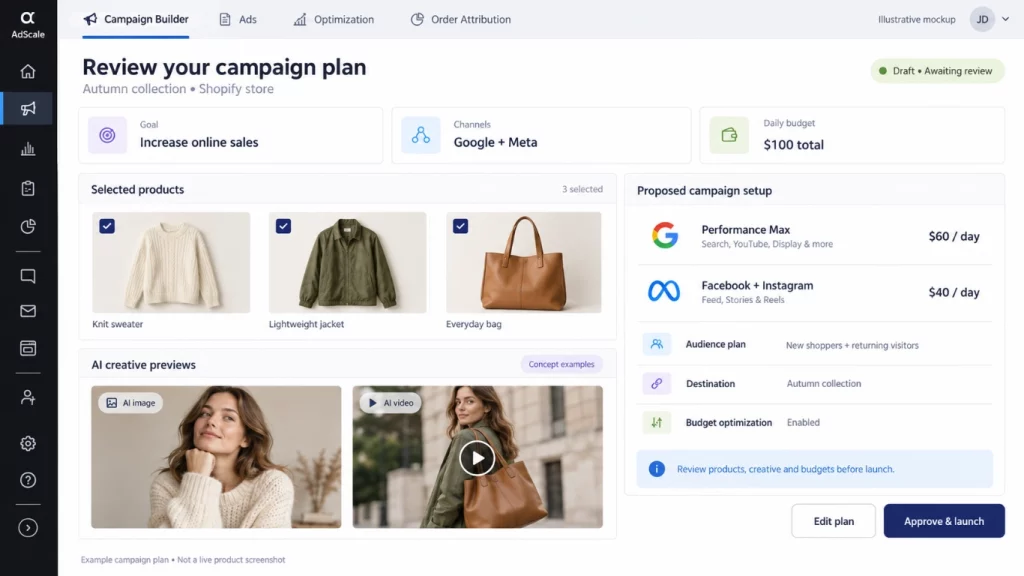
AdScale’s AI campaign builder uses store data to help prepare a media plan, audiences, and ads. For a Shopify merchant, the appeal is continuity: products and customer information help inform the campaign setup, then ongoing management supports the work after launch.
That makes AdScale worth considering when coordinating two advertising platforms has become a recurring task for your team.
Advantages#
- Google and Meta coverage. The Shopify listing includes Google Search and Performance Max, plus Facebook and Instagram advertising.
- Creative and optimization tools together. AI image and video creation sit alongside automated bid and budget management.
- A store-based planning workflow. Review proposed products, audiences, creative, and budgets in the context of what your store sells.
The first two capabilities are documented in AdScale’s Shopify App Store listing. The broader workflow is explained in the campaign builder guide.
Disadvantages#
- The subscription matters at smaller budgets. A monthly software fee takes a larger share of total marketing costs when media spend is low.
- Channel coverage is focused. Merchants seeking TikTok, Pinterest, or a broader programmatic advertising platform will need another solution for those channels.
- A proposed plan still needs business judgment. Your team must check margins, stock, offers, and creative before approving spend.
Pricing#
AdScale lists Basic at $169/month, Growth at $249/month, and Elite at $329/month. Their monthly ad-spend limits are $1,000, $2,000, and $3,000, respectively. All three list a 14-day free trial. Media spend is additional. AdScale Shopify plans.
Choose the tier for your planned spend and check creative allowances. For budgets above the listed limits, consult AdScale pricing for the applicable plan.
Recommendation#
Try AdScale when your priority is bringing Google and Meta campaign work into a store-based workflow. Its fit is strongest when you need help with both campaign setup and the ongoing decisions that follow.
Adwisely: Best for Automation With Optional Expert Management#
Best for: Eligible Shopify stores that want Google and Meta campaigns, with the option to add dedicated advertising expertise.
Adwisely combines automated campaign management with two service levels. Self-Serve provides automation and support, while Concierge adds expert involvement. Its Shopify listing describes prospecting, retargeting, and performance reporting across Google and Meta.
Advantages#
- Two ways to work. Choose automated campaigns with email and chat support, or a plan with dedicated experts.
- Both acquisition and retargeting. The platform supports reaching new shoppers and returning visitors.
- Defined expert support. Concierge lists ten hours of monthly expert work, split between Google and Meta. Adwisely plans.
Disadvantages#
- New stores may not qualify. Adwisely requires an active Shopify store with either 100 or more online orders in the last 90 days or at least $10,000 in monthly online revenue. Tracking must also be installed. Stores close to qualifying can request manual review. Adwisely eligibility requirements.
- The entry price is a minimum. Fees rise with managed ad spend until the published cap applies.
- Dedicated expert time belongs to Concierge. Self-Serve includes email and chat support, but not the same expert management allowance.
Pricing#
Self-Serve costs 10% of managed ad spend, with a $49 monthly minimum. Concierge uses the same percentage with a $249 monthly minimum. Both list a $3,250 monthly fee cap and a seven-day free trial. Media spend is separate. Adwisely pricing.
For example, $3,000 in managed monthly ad spend produces a $300 fee under either plan. The minimum is not added on top of that amount. Adwisely billing explanation.
Recommendation#
Adwisely deserves a place on the shortlist when expert involvement is a priority. Confirm eligibility first, then compare the service level and total fee at your actual budget.
Madgicx: Best for Meta Creative Testing and Optimization#
Best for: Shopify teams whose main advertising workload involves Facebook and Instagram creative, launches, and account analysis.
Madgicx focuses its core advertising workflow on Meta. Its tools cover creative generation, account analysis, optimization, and ad launch. This makes it relevant when your bottleneck is developing and managing the next round of Meta ads.
Advantages#
- Creative production and launch tools. Madgicx offers AI ad generation and tools for deploying creative into campaigns. Madgicx AI Ads.
- Reuse of existing assets. Ad Launcher combines creative and copy, and can turn Facebook and Instagram posts into ads. Madgicx Ad Launcher.
- Reporting beyond Meta. One-Click Report supports sources including Google Ads, Shopify, and Google Analytics 4. Madgicx reporting details.
Disadvantages#
- Reporting coverage is broader than the verified launch workflow. The documented Ad Launcher centers on Meta. If Google campaign creation is essential, request a demonstration of that specific capability.
- Tracking can add to the bill. The pricing page lists Tracking Pro as a separate add-on.
- It suits an active testing process. The creative and analysis tools are most useful when someone owns the decisions about what to test next.
Pricing#
Madgicx uses a pricing selector based on monthly ad spend and billing period. It advertises a seven-day trial and lists Tracking Pro at $49 per month as an add-on. Use the live selector for the main subscription quote. Madgicx pricing.
Recommendation#
Choose Madgicx for a Meta-centered workflow, particularly when creative testing needs more structure. For a combined Google and Meta builder, verify the exact Google actions available before choosing it.
AdRoll: Best for Retargeting and Broader Advertising Reach#
Best for: Shopify merchants expanding into product retargeting and advertising across websites, apps, and other inventory.
AdRoll Marketing & Advertising combines campaign-building and optimization with access to broader advertising inventory. Its Shopify integration connects a product feed, installs its pixel, and creates audiences from shopping behavior. Social advertising and cross-channel attribution are add-ons to the self-service Ads offering. AdRoll packages.
Advantages#
- Product-based retargeting. Dynamic ads can show shoppers products they viewed or added to their cart.
- Shopify audience connections. Store behavior and Shopify customer segments can inform advertising audiences. AdRoll’s Shopify integration.
- Broader inventory. Its Shopify listing includes display, native, mobile app, video, and connected TV advertising, supported by AI bidding. AdRoll’s Shopify listing.
Disadvantages#
- Some capabilities cost extra. Social advertising and cross-channel attribution are add-ons to the self-service Ads offering.
- Its focus differs from a Google Search and Meta builder. Open-web reach is valuable if that is your goal. It does not, by itself, establish support for the Google campaign types you need.
- Retargeting needs an audience. A store with little existing traffic has fewer visitors to re-engage, so retargeting alone cannot replace acquisition.
Pricing#
AdRoll’s Shopify app is free to install, with a listed minimum campaign budget of $5 per day. Its main pricing page describes pay-as-you-go advertising, with additional packages and add-ons. Free installation does not mean free advertising. Shopify listing, AdRoll pricing.
Recommendation#
Consider AdRoll when you want to extend your advertising reach and build a broader retargeting program. Compare its channel mix and full package cost with your specific launch requirements.
When Should You Choose One of the Store Builders Instead?#
If the store or landing page is your immediate bottleneck, the five tools below deserve a closer look. Their advantages concern the shopping experience and setup process. They are not being ranked against AdScale on advertising performance.
Shopify AI Store Builder: For an Initial Store Design#
Advantage: Generate design options from a short business description without buying a separate design-generation app. Shopify lets you generate multiple designs for free.
Disadvantage: Design generation covers only part of a launch. You still need to review the content and complete your store setup, including products and delivery information.
Cost: Design generation is free. Budget separately for operating the Shopify store. Shopify AI Store Builder.
Choose it when: You are starting a store and need a design to work from.
Atlas: AI Store Builder for Product-Based Launches#
Advantage: Atlas turns product links into stores or product pages and includes bundle and cart upsell features. That combination suits merchants building a shopping experience around selected products.
Disadvantage: The base subscription includes limits on published pages, bundle revenue, and cart orders. A growing store should price the capacity it needs.
Cost: Shopify lists All-in-One at $39 per month, with additional charges and a seven-day trial. Review the applicable usage limits before subscribing. Atlas Shopify pricing.
Choose it when: You need product pages and merchandising features together.
CreateMyStore: For a New Store With Conversion Tools#
Advantage: CreateMyStore combines store design, product content, and access to Vitals tools such as reviews, bundles, and pop-ups.
Disadvantage: Its full store builder is intended for new Shopify stores. Free store creation also does not mean every included service remains free: Vitals starts with a seven-day trial.
Cost: Building the store is free. The vendor advertises a seven-day Vitals trial, then $1 for the first paid month and $29.99 per month afterward. Shopify’s subscription is separate. CreateMyStore’s published offer.
Choose it when: You are creating a new store and want several conversion tools in the initial setup.
Dropmagic: AI Store Builder for Product-Based Stores#
Advantage: Dropmagic brings product import, generated copy, imagery, and page design into one workflow.
Disadvantage: The free tier is for building and previewing a store. Publishing and expanded use require a paid plan, so the free preview is not the full ongoing cost.
Cost: Shopify lists Premium at $79 per month. Its Free generation plan cannot publish to Shopify. Dropmagic Shopify plans.
Choose it when: You want to build around a product and review the generated store before paying to publish.
Instant AI Page Builder: For Campaign Landing Pages#
Advantage: Instant focuses on Shopify pages and sections, making it relevant when an offer needs a dedicated destination. Its plans also offer page analytics and, at higher tiers, testing features.
Disadvantage: Publishing allowances, templates, AI credits, and testing capacity differ by plan. Price the pages and experiments you intend to run.
Cost: Shopify lists Starter at $39/month, Pro at $99/month, and Business at $249/month. The free Developer plan is for development stores; Starter lists a seven-day trial. Instant Shopify plans.
Choose it when: You already have a store and need pages for specific products, collections, or promotions.
A store builder and an ad platform can both earn their place. Choose each for the work it performs, and include both subscriptions in your marketing costs.
Do You Need a Third-Party Builder at All?#
Start by considering your existing tools. Google already provides AI across Performance Max bidding, targeting, and creative. Shopify documents creating Performance Max campaigns through Merchant Center, accessible from its Google & YouTube channel. Google Performance Max overview, Shopify setup guidance.
Meta also provides its own advertising tools and a Shopify integration for Facebook and Instagram.
If your current setup is manageable, a new subscription needs a clear justification. Add a builder when it solves a recurring problem, such as preparing campaigns across both platforms or connecting store information with advertising decisions.
Example: Choosing Tools for a Shopify Collection Launch#
Imagine an apparel store preparing an autumn collection. It needs a collection page, new product advertising on Google, and fresh Meta creative.
This is an illustrative planning example, not a customer case study or a performance test.
The merchant first reviews the shopping experience. If the current Shopify theme already presents the collection well, another page builder may add little. If the offer needs a dedicated landing page, a tool such as Instant can help prepare it.
Next comes advertising. The merchant can evaluate AdScale using the same collection: review proposed products, audiences, creative, and budgets across Google and Meta. A team mainly seeking expert management could also assess Adwisely. A Meta-focused creative team might prioritize Madgicx, while a broader retargeting brief could justify AdRoll.
The decision becomes clearer when each subscription has a defined job. For this merchant, the question is whether the combined workflow makes the next launch easier to prepare, approve, and measure.
How to Evaluate a Builder Before Committing#
Use the same brief for every vendor: one collection, one business goal, and a fixed spending limit.
- Ask to see the campaign output. Inspect products, copy, images, destinations, and campaign settings. Distinguish a suggested plan from campaigns ready to publish.
- Check the budget rules. Establish the opening spend, who can change it, and how existing campaigns affect the total.
- Review account ownership. Confirm what happens to campaigns and assets if you cancel. Also identify which existing campaigns the tool will change.
- Calculate the full cost. Add software, media, creative extras, tracking, and any service fees. Compare quotes at the same expected spend.
- Choose a business measure. Track time saved alongside acquisition cost and contribution after advertising costs. Use a consistent attribution approach when comparing results.
A short trial can reveal workflow quality and setup problems. It may not provide enough sales data to establish a reliable performance difference.
Frequently Asked Questions#
AdScale is this guide’s recommendation for Shopify merchants seeking campaign planning and management across Google and Meta. Adwisely suits stores seeking optional expert involvement. Madgicx focuses on Meta workflows, while AdRoll fits broader retargeting needs. Choose according to the channels, support, and campaign tasks your store needs.
AdScale complements these store and page builders by handling advertising. Atlas and Dropmagic focus on stores and pages, while Instant focuses on pages and sections. AdScale helps create and manage advertising campaigns. A Shopify merchant can use a page builder for the ad destination and AdScale for Google and Meta advertising.
Yes, AdScale can create campaigns that use native platform automation. For example, AdScale’s Shopify listing includes Performance Max. The builder manages its supported workflow, while Google or Meta delivers the ads. Confirm the campaign types and controls available in your plan. AdScale listing.
AdScale and Adwisely suit existing Shopify stores that need Google and Meta campaign management. Consider Madgicx for Meta creative work or AdRoll for broader retargeting. If your landing page needs improvement, start with a page builder before adding more advertising tools.
No campaign builder can guarantee a particular return for every Shopify store. Results depend on the offer, margins, creative, tracking, customer demand, and site experience. Evaluate setup quality first, then assess performance over a suitable period using consistent reporting and enough sales data to make a useful comparison.
Why Try AdScale First for Google and Meta?#
AdScale suits eCommerce teams that want product advertising, AI image and video creation, and ongoing campaign optimization in one platform.
If your store is ready and your next task is advertising it, AdScale is a practical place to start. Its appeal is bringing Shopify products, customer information, and Google and Meta campaign work together.
Choose a store or page builder when the shopping experience needs work. Choose your advertising platform for the campaigns you need to launch and manage. For many stores, those decisions complement each other.
AdScale connects campaign planning with ongoing work. Assess its campaign builder alongside AdScale’s optimization tools and order attribution, then decide whether the combined workflow improves your process.
Start with a real collection and your actual budget. Review the proposed ads and campaign plan against what you would launch yourself.
Explore AdScale’s AI campaign builder and see how it handles your store’s next campaign.
Keep Learning#
- What Is an AI Campaign Builder? A Shopify Guide: Understand campaign creation, store data, and the review process.
- Best AI Tools for Google and Meta Ads: Explore the broader advertising tool category.


 Shopify
  WooCommerce
  PrestaShop
  Magento
  BigCommerce
  Opencart
  Wix
Wix 



 ,
,