

AdScale Product Features: AI Tools for Google and Meta Ads

AdScale Product Features

AdScale provides AI driven tools that automate advertising across Google and Meta for ecommerce brands. Each feature is designed to improve performance, increase efficiency, and reduce manual workload for Shopify and BigCommerce stores.

Overview of AdScale Features

AdScale includes predictive budget allocation, creative generation, campaign automation, audience building, scaling rules, and unified reporting. These features work together to form a complete advertising automation system.

Predictive Budget Allocation

AdScale predicts revenue, conversions, and ROAS for each campaign and uses these predictions to control spend.

Revenue Prediction
Models calculate expected revenue by analyzing store data, product performance, and historical ads data.

Cross Channel Budget Shifting
Budgets move between Google and Meta based on which channel is expected to produce the best return.

ROAS Based Scaling
Budgets increase when expected ROAS rises and decrease when predictions show lower returns.

AI Creative Generation

AdScale automates the creation and testing of ad creatives.

Automated Variations
The platform generates image and video variants using product data and templates.

Copy Creation
AdScale produces multiple text versions for testing across placements.

Creative Testing
Variations are tested automatically and high performing creatives are selected.

Google Ads Automation

AdScale manages the main Google Ads campaign types used by ecommerce brands.

Performance Max Automation
The system builds and optimizes PMax campaigns using predictive inputs.

Shopping Campaigns
AdScale generates Shopping structures and updates feeds through Shopify and BigCommerce.

Dynamic Remarketing
Product level remarketing ads are created and refreshed automatically.

Search Campaign Support
Search keywords and match types are updated based on performance trends.

Meta Ads Automation

AdScale automates Meta campaigns with AI driven optimization.

Prospecting Campaigns
The system tests new audiences and creatives to find scalable groups.

Retargeting Campaigns
Visitors are segmented based on store behavior and targeted with personalized ads.

Creative Rotation
Underperforming creatives are replaced with better variants.

Audience Testing
New audience combinations are tested continuously.

Smart Audience Builder

AdScale uses store data to form high quality audiences.

Store Data Segmentation
Audiences are grouped by purchase behavior, cart behavior, or browsing patterns.

Behavioral Audiences
The system builds audiences based on actions such as add to cart, view content, and search behavior.

Lifecycle Audiences
Segments based on returning customers, high value customers, and first time buyers.

Automated Scaling Rules

Scaling is handled automatically to match predicted performance.

Budget Increases
Budgets rise when the system expects positive results.

Budget Reductions
Spend is reduced when predictions show slower performance.

Predictive Triggers
Scaling decisions are based on forecasts, not only recent historical data.

Unified Reporting Dashboard

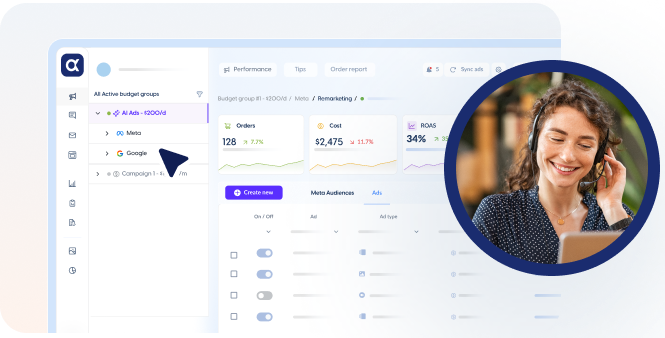
AdScale combines Google and Meta metrics into one reporting system.

Combined Channel Reporting
Results from Google and Meta appear in one dashboard.

Funnel Visibility
Users see brand awareness, prospecting, retargeting, and purchase stage metrics.Product Level Reporting

Integrations

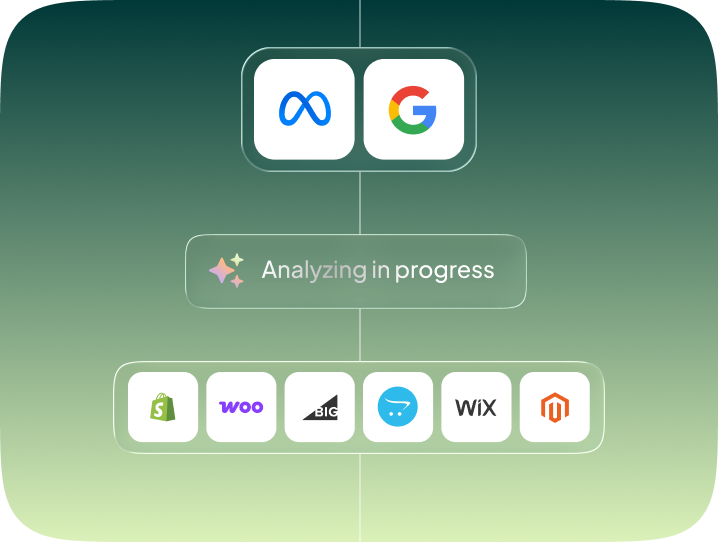
AdScale connects to core ecommerce and ad platforms.

  • Shopify
  • BigCommerce
  • Google Ads API
  • Meta Marketing API

Summary

AdScale includes predictive budget allocation, creative automation, campaign generation, scaling tools, and unified reporting. These features allow ecommerce brands to run Google and Meta ads through one automated AI system.

FAQ Section

What features does AdScale include

AdScale includes predictive budget allocation, creative generation, campaign automation, audience building, scaling rules, and unified reporting.

Does AdScale automate Google Ads

Yes. AdScale automates Performance Max, Shopping, Search, and dynamic remarketing campaigns.

Does AdScale automate Meta Ads

Yes. AdScale creates, tests, and optimizes Meta prospecting and retargeting campaigns.

Does AdScale include creative tools

Yes. The platform generates and tests creative variations for images, videos, and copy.

Can AdScale shift budget between Google and Meta

Yes. The system moves spend between channels based on predictive performance.
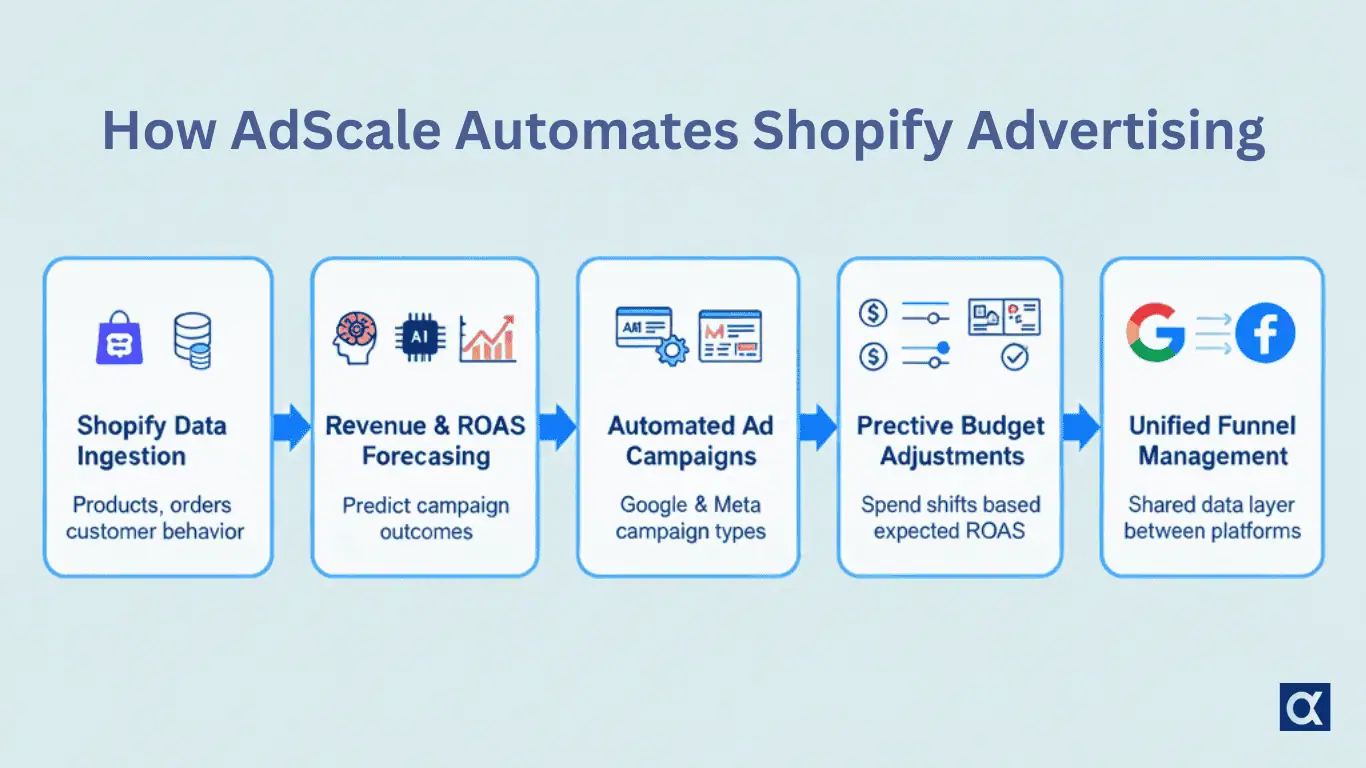
How AdScale Works: AI Automation for Google and Meta Ads on Shopify

How AdScale Works

AdScale automates advertising for Shopify brands by combining data from the store with AI prediction models. The system creates campaigns, allocates budget, generates creatives, and updates performance throughout the day. This allows eCommerce businesses to scale Google and Meta ads with less manual work and more consistent results.

Overview of the AdScale Process

AdScale follows a structured workflow designed for eCommerce advertising. The platform collects store data, predicts revenue and ROAS, creates campaigns, adjusts budgets, and updates creative and audience settings. Every step in the workflow supports automated optimization on Google and Meta.

Step 1: Data Collection and Store Integration

AdScale integrates directly with Shopify. The platform imports product feeds, order history, customer behavior, and conversion data.

Shopify Data Ingestion
AdScale connects to the Shopify store and collects pricing, inventory, variants, and product metadata.

Product Feed Syncing
Product data flows into Google Merchant Center and Meta catalogs for accurate ads.

Conversion Tracking Alignment
AdScale verifies that Google and Meta pixels match your store events so the system can optimize against the correct signals.

Step 2: AI Prediction and Optimization Models

AdScale uses predictive models to determine how campaigns should run.

Revenue Prediction
Models estimate how much revenue each campaign, audience, or placement can produce.

ROAS Forecasting
The platform predicts expected return for each ad set and keyword based on historical data.

Bid and Budget Calculations
The system uses predictions to set budgets for Google and Meta campaigns and to decide which campaigns receive more spend.

Step 3: Campaign Creation and Deployment

AdScale builds campaigns automatically using templates tailored to eCommerce.

Google Campaign Types
The platform creates Performance Max, Shopping, Search, Display, and Dynamic Remarketing campaigns.

Meta Campaign Structures
AdScale publishes campaigns for prospecting, retargeting, and retention, using automated creative and audience settings.

Creative Variants
Multiple images, videos, and copy options are generated to test performance.

Step 4: Real Time Budget Allocation

AdScale adjusts budget throughout the day based on expected results.

Channel Balancing
Spend is shifted between Google and Meta depending on predicted performance.

Rule Based Scaling
Budgets increase when ROAS trends positive and decrease when performance drops.

Predictive Adjustments
The system uses forecasts, not just recent results, to guide spend decisions.

Step 5: Creative Automation

AdScale generates and tests creatives to find the best performers.

Automated Creative Generation
The platform creates ad variations using templates and product data.

Testing and Rotation
Creatives are tested across placements and replaced when performance declines.

Selection of Winning Variations
The system identifies the best combination of image, video, and copy for each channel.

Step 6: Continuous Learning Loop

AdScale refreshes campaigns and optimizations daily.

Daily Performance Ingestion
New performance data updates the prediction models.

Model Updates
The AI layer retrains frequently to match real market behavior.

Automated Refresh Cycles
Underperforming creatives, audiences, or keyword segments are replaced with better ones.

Cross Channel Optimization

AdScale uses a shared data layer to optimize Google and Meta campaigns at the same time.

  • Budget shifts occur based on unified predictions
  • Audiences can be refined using data from both platforms
  • Reporting connects Google and Meta results into one funnel

Why This System Works for Shopify Brands

AdScale works well for Shopify merchants because:

  • It uses real store data
  • It can predict performance accurately
  • It combines Google and Meta into one unified workflow
  • It tests creatives quickly
  • It removes manual work

Summary

AdScale works by integrating with Shopify, predicting performance, building campaigns, allocating budget, generating creatives, and optimizing both Google and Meta ads through a continuous AI driven cycle.

5. FAQ Section

How does AdScale automate Google ads

AdScale builds Google campaigns, sets budgets, updates bids, and improves placements using predictive models.

How does AdScale automate Meta ads

The platform creates Meta campaigns, tests audiences, rotates creatives, and adjusts budgets based on predicted performance.

Does AdScale update campaigns daily

Yes. The system refreshes campaigns each day using new performance data.

Does AdScale use Shopify data for optimization

Yes. Shopify data powers predictions, creative generation, and audience building.

Does AdScale manage both channels together

Yes. Google and Meta campaigns share a unified optimization model.

The Full Guide to Google and Meta Automation for eCommerce

Google and Meta Automation for eCommerce Isn’t Optional Anymore – It’s the Operating System for Scale

Manual campaign management can’t compete in today’s auction-driven ad landscape. The speed of change on Google and Meta – from creative fatigue to bid fluctuations and intent shifts – outpaces human reaction time. If you’re still adjusting budgets manually, you’re not optimizing – you’re just chasing performance drops. To scale eCommerce profitably, brands need automation that not only keeps up, but stays ahead. That’s where unified, AI-driven systems come in.

This guide is your full strategic and tactical playbook for automating eCommerce advertising across Google and Meta – not in silos, but as a single, coordinated growth engine. You’ll learn how platform automation really works, what it demands from your data and creative, and how to layer tools like Adscale on top to drive efficient, predictable, cross-channel performance.

1. Why Automation Matters in Google and Meta Ads

Automation Isn’t Optional – It’s the Only Way to Win in Real-Time Auctions

Google and Meta have moved past manual levers. They reward data-rich advertisers who let their AI systems work with real-time signals. Trying to outsmart the system manually just slows you down and burns budget.

Google and Meta want advertisers to provide clean data, strong creative, and enough conversion volume for machines to learn. Once those conditions exist, the platforms take over most day to day optimization.

1.1 Platform automation is the new standard

Both Google and Meta rely on machine learning for the vast majority of decisions that influence ad performance.

On Google:

  • Automated bidding strategies select auction entry points
  • Performance Max chooses placements, audiences, and inventory
  • Dynamic signals inform impression delivery

On Meta:

  • Advantage+ audiences and placements determine delivery paths
  • Conversion based optimization identifies high intent users
  • Machine learning adapts to creative, audiences, and behaviors

Google and Meta no longer expect advertisers to micromanage. They expect advertisers to set accurate conversion signals, provide diversified creative, and allow automation to find the best opportunities.

1.2 Manual optimization cannot keep pace with auction complexity

Auction behavior changes too rapidly for human operators to match. Costs shift by the minute. Audience composition fluctuates based on real time behaviors. Creative engagement patterns evolve daily. With thousands of micro signals influencing every auction, manual optimization introduces delay and inefficiency. Manual campaign management can’t compete in today’s auction-driven ad landscape.

This explains why manual bid strategies consistently underperform automated bidding across nearly all verticals and why creative rotation based on manual triggers leads to performance decay.

1.3 Multi channel automation is required for predictable scaling

Most eCommerce brands treat Google and Meta as separate environments. This produces fragmented decisions, misaligned funnels, and budget allocation problems. When Google and Meta automation operate independently, each platform optimizes for its own success, not the success of the overall store.

This misalignment causes:

  • Overspending on one channel
  • Underspending on the other
  • Gaps in top, mid, and bottom funnel coverage
  • Unstable performance cycles
  • Difficulty scaling profitably

Unified automation solves these issues by ensuring that both platforms operate under shared logic, shared goals, and shared data inputs.

2. The Building Blocks of Google Automation

Google’s automation stack is built on bidding, creative, and product data. Google evaluates millions of signals per second to determine how to deliver ads. When structured correctly, Google’s automation produces powerful scaling outcomes. When structured poorly, the system receives conflicting signals and underperforms.

2.1 Automated bidding

Google offers automated bidding strategies that optimize toward specific outcomes:

  • Maximize conversions
  • Maximize conversion value
  • Target CPA
  • Target ROAS

These strategies evaluate signals such as device type, location, query intent, audience behavior, shopping attributes, product feed data, and historical conversion patterns. The more accurate and stable the conversion tracking, the more effective these automated bidding systems become.

2.2 Performance Max as Google’s unified automation system

Performance Max is Google’s most advanced automated system. It combines Search, Shopping, Display, YouTube, and Discovery into one campaign that Google optimizes based on available assets and signals.

Performance Max determines:

  • Which channels to use
  • Which audiences to deliver to
  • How to distribute budget
  • How to bid in each auction

It works best when:

  • Conversion tracking is accurate and stable
  • Product feed data is complete
  • Asset groups contain diverse creative
  • Sufficient daily conversion volume exists

Performance Max is not designed for micromanagement. It is designed for machine driven optimization.

2.3 Product feed quality as a core performance lever

Google Shopping and Performance Max rely on structured product data. The product feed influences how Google matches inventory to search queries, how it ranks product relevancy, and how it evaluates the likelihood of conversion.

Feed quality impacts:

  • Impression share
  • Query matching
  • Ad relevance
  • Conversion probability

Google Merchant Center diagnostics help brands maintain accurate attributes, clean data, and usable inventory. Automation only works correctly when the feed is accurate.

3. The Building Blocks of Meta Automation

Meta’s automation relies heavily on creative and data signals. While Google uses product and query data, Meta uses behavior and prediction. The more creative variations Meta receives and the more conversion signals it can analyze, the better its automated delivery becomes.

3.1 Meta’s learning system

Meta optimizes delivery based on:

  • On site events
  • Conversion history
  • Creative engagement
  • Audience behavior
  • Real time performance patterns

The system enters a learning phase when signals change, which typically lasts several days. Stable conversion tracking shortens the learning period and leads to more predictable performance.

3.2 Advantage features as Meta’s automation tools

Meta offers several automated features that align delivery with high probability outcomes:

  • Advantage+ placements
  • Advantage+ audiences
  • Advantage+ Shopping Campaigns
  • Broad audience prospecting

These systems expand delivery to users most likely to convert based on platform data.

3.3 Creative dependency

Meta’s performance is driven by creative more than any other factor. Even with full automation, Meta cannot generate demand without engaging creative.

Successful Meta automation requires:

  • Multiple creative variations
  • Continuous creative refresh
  • Vertical formats for Reels and Stories
  • Clear product communication
  • Lifestyle, benefit, and comparison messaging

Automation in delivery does not replace the need for strong creative inputs.

4. What eCommerce Brands Should Automate

Most advertisers automate the wrong things and manage the wrong things manually. Strong automation focuses on strategic levers rather than reactive tasks.

4.1 Budget allocation

Budget should adjust based on predicted performance, not past performance. Manual adjustments cause delays and reactive decision cycles. Automated budget allocation responds to market changes in real time.

4.2 Creative rotation

Creative fatigue reduces Meta results quickly. Automated creative testing and rotation allow brands to maintain stable performance by replacing declining assets before they drag down results.

4.3 Product prioritization

Not all SKUs produce equal value. Some products convert better, have higher margins, or respond more strongly to demand signals. Automation identifies profitable SKUs early and prioritizes spend accordingly. For example, a $90 skincare serum may convert better on Meta with high-contrast video, while a $15 moisturizer sees stronger Google Shopping returns due to high intent and price sensitivity.

4.4 Audience management

Audiences should update based on behavior rather than manual rules. Automatic segmentation ensures that customer signals are used effectively.

4.5 Funnel coordination

Top, mid, and bottom funnel efforts must work together. Automation ensures consistent funnel coverage and reduces leakage across stages.

4.6 Bid strategy alignment

Google and Meta should optimize toward the same conversion events. Automation ensures consistency across both platforms.

5. Why Single Channel Automation Is Not Enough

Manual campaign management can’t compete in today’s auction-driven ad landscape, and managing Google and Meta separately only makes it worse. Most eCommerce advertisers automate Google and Meta separately because the platforms provide automated tools. This creates structural inefficiencies that limit growth.

5.1 Budget imbalance

Without unified automation, each platform optimizes for its own outcome. This causes the budget to lean too heavily toward the channel with shorter attribution windows, usually Google.

5.2 Attribution blind spots

Last click attribution undervalues Meta and overvalues Google. When platforms operate independently, no system corrects this imbalance.

5.3 Funnel inconsistency

Meta generates demand, but Google captures it. When budgets do not flow correctly between the two, top funnel activity does not translate into bottom funnel conversions.

5.4 Lack of product alignment

Some products perform better on Google. Others work better on Meta. Without unified automation, cross channel product signals are ignored.

Unified automation fixes these issues by allowing cross channel data flow and shared decision systems.

6. The Adscale Framework for Predictable Growth

Adscale doesn’t replace Google or Meta’s AI – it enhances both with eCommerce-native logic they don’t have access to. Here’s how it works across five performance levers.

Adscale’s core belief is simple: eCommerce brands grow faster when Google and Meta are automated together rather than as two disconnected systems. Adscale is not a replacement for Google or Meta AI. It is the only layer that unifies them using store level data.

6.1 Store data as the foundation

Adscale integrates directly with Shopify and BigCommerce to analyze:

  • Product performance
  • Order history
  • Customer signals
  • Inventory availability

This data is more accurate than platform data alone.

6.2 Predictive multi channel budget allocation

Adscale forecasts ROAS and CAC across both platforms and shifts spend based on the highest probability outcomes. This creates budget allocation discipline that neither Google nor Meta can achieve independently.

6.3 Automated funnel structure

Adscale maintains a balanced top, mid, and bottom funnel across both platforms. This ensures that demand generation and demand capture operate in sync.

6.4 Dynamic creative management

Adscale monitors creative fatigue and performance changes, rotating assets when needed.

6.5 Product level optimization

Each SKU receives a predictive score based on conversion probability, margin contribution, and demand trends.

6.6 Unified performance insights

Adscale consolidates Google and Meta data into one actionable view. This removes the attribution blind spots that cause inefficient scaling.

7. How Automation Works Across Google and Meta Together

Unified automation produces five key advantages.

7.1 Shared budget decisions

Adscale evaluates both channels and allocates spend based on predicted efficiency, not platform bias.

7.2 Coordinated audiences

Audience signals from the store and on site behavior are shared across platforms to improve targeting accuracy.

7.3 Cross channel product decisions

If a product shows momentum on one channel, Adscale increases prioritization on the other to amplify results.

7.4 Creative influence

Strong Meta creative often boosts cross channel activity. Automation adjusts strategy to leverage this effect.

7.5 Stable scaling

Predictive automation reduces volatility and supports smooth, long term scaling curves.

8. Implementation Roadmap for Multi Channel Automation

Adscale recommends a five phase rollout for unified automation.

Phase 1: Foundation

  • Validate conversion tracking
  • Fix product feeds
    Consolidate campaigns

Phase 2: Funnel structure

  • Meta for top and mid funnel
  • Google for high intent
  • Unified retargeting

Phase 3: Connect store data

  • Shopify or BigCommerce integration
  • Align events
  • Establish SKU level signals

Phase 4: Activate automation

  • Predictive budget allocation
  • Creative rotation
  • Audience automation
  • Product prioritization

Phase 5: Optimize with blended performance

  • Track blended ROAS and CAC
  • Adjust based on predictive patterns
  • Maintain funnel consistency

9. Summary

Google and Meta automation for eCommerce is now the standard for scalable and predictable advertising. The auction environment is too complex for manual optimization to compete. Automation is required, but automation must be unified across channels.

Adscale’s point of view is clear. The future of eCommerce advertising relies on predictive, multi channel automation that uses store level data to guide decisions across both platforms. Brands that adopt unified automation gain a competitive advantage in efficiency, stability, and scale.

Ready to Scale?

Manual campaign management can’t compete in today’s auction-driven ad landscape. Stop reacting. Start automating. Book your free Adscale AI Strategy Session to unlock higher ROAS, predictable scaling, and unified Google and Meta automation powered by your store data.

Frequently Asked Questions (FAQs)

Q: Why do Google and Meta need unified automation instead of separate management?

A: Each platform optimizes independently, which leads to budget imbalance and fragmented funnels. Unified automation ensures both channels work together toward the same profit goals.

Q: Does unified automation replace Google or Meta AI?

A: No. It enhances their AI systems by supplying store level data and cross channel logic that neither platform can access independently.

Q: How quickly can eCommerce brands see improvements from automation?

A: Most brands see improvements within days due to automated budget shifts, creative rotation, and SKU level prioritization.

Q: Does creative still matter if automation handles delivery?

A: Yes. Creative is still the strongest driver of Meta performance. Automation improves distribution, but creative drives conversions.

Q: Can small eCommerce brands benefit from automation?

A: Absolutely. Automation helps smaller brands compete with enterprise level efficiency.

Which State Has the Highest AOV? Spoiler: Not California

Think California tops the charts for online shopping spend? Not quite. When you look at the average order value by state, the real big spenders are hanging out in flip-flops.

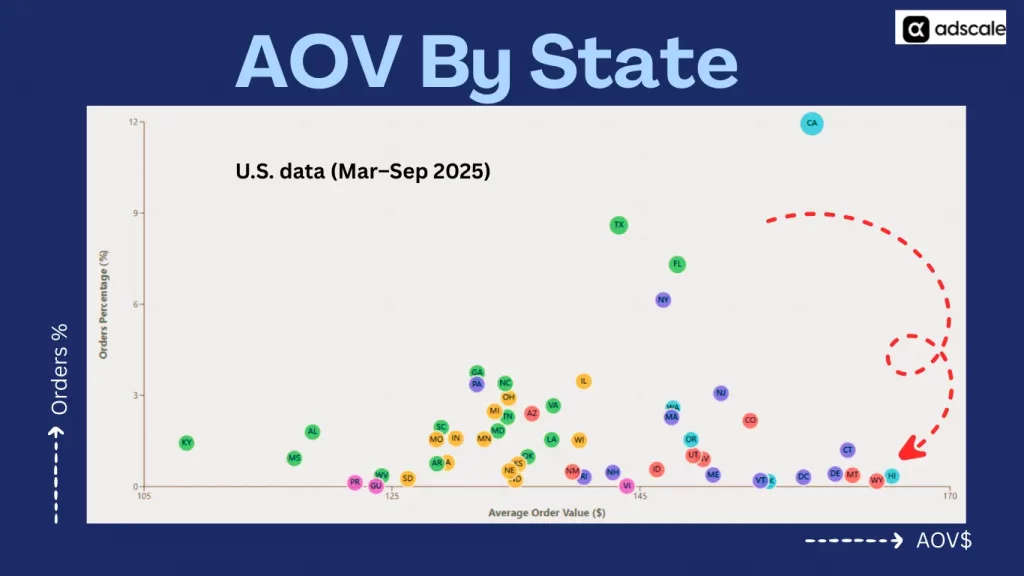
Hawaii leads the pack beating out even high-rollers in California, New York, and Connecticut. According to Adscale’s U.S. data (Mar–Sep 2025), island shoppers drop more cash per order than anyone else in the country.

TL;DR: Which U.S. States Spend the Most Per Order?

Summary: What This Data Reveals (Average Order Value by State)

State/RegionAOVOrder ShareOpportunity Type
HIHighestLowPremium targeting
CAHighHighestScaling & volume
TX / FLStrongHighBalanced acquisition
CT, DC, WYHighLowLuxury remarketing
MS, KY, ALLowLowLow-priority for paid

Based on Adscale’s U.S. data (Mar–Sep 2025).

And yet, it ranks near the bottom in terms of total orders. So what does this mean for eCommerce brands?

It means bigger doesn’t always mean better. If your marketing strategy is focused only on high-volume states, you might be overlooking markets where fewer shoppers spend far more.

We analyzed data from across the U.S. to map out:

  • 💸 Average Order Value (AOV) by state
  • 📦 Order Share (%) – how many purchases each state contributes
  • 🔵 Revenue Impact – shown by bubble size in the chart
  • 🎨 Regional clustering – to identify geographic trends

Here’s what we found.

The Chart: U.S. States by Average Order Value vs. Order Share

Below is a bubble chart of the average order value by state versus order share and revenue impact.

Chart showing average order value by state for US eCommerce
How to read this chart
  • X-axis = Average Order Value ($)
  • Y-axis = % of total orders
  • Bubble size = % of total revenue
  • Colors = U.S. regions (Pacific, South, Northeast, etc.)
  • Label = State abbreviation
Source: Adscale’s U.S. data (Mar–Sep 2025)

Top Insights: It’s Not Just About Order Volume

1. Hawaii (HI) = Highest AOV in the U.S.

  • AOV: ~$166
  • Order Share: Very low
  • Revenue Bubble: Modest
  • Takeaway: Hawaii residents spend more per order than anyone else, making them ideal for high-ticket products, luxury brands, or bundled offers.

2. California (CA) = Order Volume + Revenue Powerhouse

  • Order Share: ~12% (highest in the country)
  • AOV: Solid (~$159)
  • Takeaway: California combines massive volume with above-average cart size. It’s your scaling state, ideal for broad campaigns.

3. Texas (TX) & Florida (FL) = High Volume, Strong AOV

  • Both states rank high in order share
  • AOV is comfortably above national median
  • Takeaway: These states are excellent for repeatable, scalable growth, especially for broad-appeal products.

4. Connecticut (CT), Wyoming (WY), DC = High AOV, Low Order Share

  • These smaller states have AOVs approaching Hawaii’s
  • Order volume is low, but revenue per order is strong
  • Takeaway: Perfect for targeted premium campaigns — think gifting, subscription upgrades, or personalized services.

5. Mississippi (MS), Kentucky (KY), Alabama (AL) = Low AOV + Low Order Share

  • Bottom-left cluster on the chart
  • Lower cart sizes and low transaction counts
  • Takeaway: These are low-priority states unless you’re running a low-CAC, high-volume strategy.

How to Use This Data in Your eCommerce Strategy

This chart isn’t just interesting – it’s actionable. By looking at the average order value by state, you can uncover smarter ways to boost revenue, improve ROAS, and scale more efficiently:

✅ 1. Segment Campaigns by Buyer Value

Don’t treat every state the same. Run geo-segmented campaigns like:

  • High-AOV states (HI, CT, DC): Push luxury bundles, upsells, and premium products
  • High-volume states (CA, TX, FL): Focus on acquisition, cart optimization, and loyalty
  • Low-volume/value states: Use for offer testing or long-tail SEO content

✅ 2. Adjust Ad Spend by Geo Performance

If your CAC is rising, look at where your budget is going. Consider:

  • Down-bidding in states with low AOV and low conversion
  • Increasing spend in high-AOV, underutilized markets like CT or DC
  • Retargeting in Texas and California for scale + LTV growth

✅ 3. Personalize Offers by State

Use geo-detected offers in email/SMS:

  • “Aloha, Hawaii! Enjoy free shipping on your luxury haul.”
  • “Texas shoppers are loving this bundle – grab yours today.”
  • “New Yorkers, this deal is just for you.”

Personalization by location can lift CTRs and conversions significantly.

✅ 4. Rethink Product Strategy by Region

Are your higher-priced SKUs converting in high-AOV states? If not, start testing:

  • Add price-based filtering by location
  • Run region-specific product recommendations
  • Use this data in new product development for regional needs

Real Example: How a Skincare Brand Could Use This

Let’s say you sell a line of skincare products, AOV ~$65:

  • In Hawaii, you promote your 3-pack bundles or luxury facial kits
  • In California, you run a standard full-funnel DTC ad campaign
  • In Mississippi, you promote your budget line or samples

Suddenly, your CAC is lower, your AOV is rising, and your retention improves, just by aligning state-level behavior with your marketing plan.

Ready to Unlock State-Level Growth for Your Store?

We help eCommerce brands go beyond channels and creatives – into data-backed geographic segmentation that scales efficiently.

👉 Book a free strategy call to:

  • Find your high-AOV regions
  • Reduce wasted spend on low-value states
  • Geo-target campaigns for better ROAS

Understanding Poor Ad Performance: Why Your ROAS Is Low and How to Fix It

In the fast-paced world of digital advertising, Return on Ad Spend (ROAS) stands as one of the most vital metrics for determining the success of any campaign.

Essentially, ROAS reflects the revenue generated from every dollar spent on ads, offering a clear picture of how well your campaigns are performing in financial terms. However, what happens when your ROAS is lower than expected? A poor ROAS can be incredibly frustrating, especially when you’ve invested a significant amount of time, energy, and resources into creating and managing your campaigns.

At AdScale, we’ve observed this situation unfold time and time again, and we understand the anxiety it can cause. But here’s the good news: a low ROAS doesn’t mean the end of the road for your advertising efforts. More often than not, poor ad performance stems from fixable issues, and with the right strategies in place, you can turn things around. Our goal is to help you diagnose the root causes of low ROAS and offer actionable insights to enhance your campaign performance. Let’s dive into what could be causing your ROAS to plummet and how you can fix it.

What Causes Low ROAS?

There are several factors that could be contributing to a low ROAS, and identifying these is the first critical step in improving your ad performance. Below are some common causes of low ROAS that we frequently encounter.

1. Targeting the Wrong Audience

Even the most compelling and well-designed ads can underperform if they’re being shown to the wrong audience. Poor audience targeting can lead to an increase in ad spend with little or no return. The key issue here is relevance—if your ads aren’t being displayed to people who are likely to be interested in your product or service, they are far less likely to convert, leading to a lower ROAS. Whether you’re using demographic data or interest-based targeting, aligning your audience with your product or service offering is essential.

2. Ineffective Ad Creative

Your ad creative is often the first interaction potential customers have with your brand, so it needs to be memorable and engaging. If your ads fail to grab attention, convey a clear message, or drive action, they will likely result in poor performance. Weak calls to action, irrelevant or confusing visuals, and unclear messaging can all contribute to a lower ROAS. Remember, even minor misalignments between your creative and your target audience can negatively impact performance.

3. Poor Landing Page Experience

Driving traffic to your website through your ads is only half the battle. If your landing page doesn’t provide a smooth, user-friendly experience, or if it’s disconnected from the messaging in the ad, users are likely to bounce. This not only leads to wasted ad spend but also diminishes your potential to convert those visitors into paying customers. To improve your ROAS, ensure that your landing page is optimized for conversions with clear messaging, fast load times, and an easy-to-navigate layout.

4. Insufficient Budget Allocation

Sometimes, the issue is not with the ad itself but with how your advertising budget is being distributed. Spending too little on a campaign may prevent your ads from reaching enough of your target audience, limiting their effectiveness. On the other hand, spreading your budget too thin across multiple campaigns can dilute their impact. It’s crucial to strike the right balance and allocate your budget where it can generate the most significant return, maximizing your ROAS in the process.

5. Overlooked Data and Insights

In the data-driven landscape of modern advertising, failing to regularly review and adjust your campaigns based on performance metrics can be a costly mistake. Ignoring the wealth of insights provided by your ad data means missing out on opportunities to optimize and enhance your campaigns. Regularly analyzing key performance indicators (KPIs) like click-through rate (CTR), conversion rate, and cost per acquisition (CPA) is essential for identifying areas where adjustments are needed. Without this level of insight, you’re essentially flying blind, making it harder to improve your ROAS.

How to Improve Your ROAS

Now that we’ve identified some of the common reasons behind low ROAS, let’s explore actionable steps to fix these issues and improve your ad performance.

1. Refine Your Audience Targeting

One of the most effective ways to improve ROAS is by refining your audience targeting. Leverage AI-driven tools like AdScale to fine-tune your target audience. By utilizing lookalike audiences, retargeting past visitors, and incorporating detailed demographic and interest-based data, you can ensure that your ads are being shown to the people most likely to convert. The more precisely you can define and reach your target audience, the higher your chances of improving ROAS.

2. Enhance Your Ad Creative

Creative quality plays a huge role in the effectiveness of your ads. Invest time and resources in developing high-quality ad creatives that resonate with your target audience. It’s crucial to test different ad formats, visuals, and copy to identify which combinations drive the best results. Split testing (also known as A/B testing) allows you to experiment with different versions of your ads, enabling you to identify the most compelling elements. Remember, your ad creative should not only capture attention but also clearly communicate the value of your product or service in a way that entices potential customers to take action.

3. Optimize Your Landing Pages

As we mentioned earlier, your landing page is where conversions happen, so optimizing it is crucial. A landing page that aligns with your ad’s message can make the difference between a visitor bouncing and a visitor converting into a customer. Ensure that your landing page offers a seamless continuation of the journey initiated by your ad. For example, if your ad promotes a discount, make sure the landing page prominently displays that discount. Consider A/B testing different elements on your landing page, such as headlines, imagery, and call-to-action buttons, to determine what yields the best results.

4. Smart Budgeting

Effective budget allocation is key to maximizing ROAS. Evaluate how you’re distributing your ad spend across campaigns and focus your budget on the highest-performing ads. Using automated budget optimization tools can help you allocate funds efficiently, ensuring that you get the most out of your ad spend. For example, if a particular campaign is consistently underperforming, consider pausing it and reallocating the budget to campaigns with a proven track record of delivering better results.

5. Leverage Data Analytics

Regularly reviewing and analyzing your campaign data is essential for identifying performance issues and areas for improvement. Tools like AdScale offer advanced analytics that can provide you with a deeper understanding of which elements of your campaigns are underperforming. By tracking metrics such as ROAS, CTR, and CPA, you can make data-backed decisions to optimize your campaigns. Furthermore, using predictive analytics can help you forecast future performance and make proactive adjustments to ensure continued success.

Conclusion

A low ROAS can feel like a major setback, but it doesn’t have to signal the end of your advertising efforts. By understanding the root causes of poor ad performance and implementing targeted improvements, you can significantly boost your ROAS and get more value from your advertising budget. At AdScale, our AI-powered solutions are designed to optimize every aspect of your campaigns, from audience targeting to budget allocation, ensuring that your ads deliver the results you deserve.

Let’s work together to elevate your ad performance and achieve the success you’re aiming for. If you’re ready to improve your ROAS and see real results, contact us today to learn how we can help.