• Platform
    • Ads
      • AI Campaign Builder
      • AI Optimizer
      • AI Audience & Segments
      • AI Creatives
    • Col-2
      • Data
        • Attribution
        • Business intelligence
      • Engagment
        • SMS
        • Email
  • Adscale Plus
  • ShopScore
  • Resources
    • Resources
      • Blog
      • Case Studies
      • Integrations
      • Agencies
      • Become a partner
      • Contact us
      • Help Center
    • Col-2
      • See it in action

        Book a demo

      • Recent blog posts
        • Meta Andromeda Update
          Meta Andromeda Update: New Creative Strategy for Facebook and Instagram Ads
          General
        • post-BFCM new customer retention
          Post-BFCM New Customer Retention: Turn First-Time Buyers Into Loyal Customers
          General
        • Q4 eCommerce strategy
          Q4 eCommerce Strategy: How to Win Holiday Sales and Grow Your Brand
          General
  • Pricing
Login
Start 14-Day Free Trial
Login
Get Started
menu

Thank you!

You’re all set! We look forward to our upcoming call!

Back to website

Share

AdScale is the leading AI-powered advertising platform for eCommerce brands. Whether you're a marketer, store owner, or media buyer, AdScale empowers you to launch, manage, and optimize campaigns across Google and Meta from one intuitive dashboard. With thousands of businesses

    Subscribe to our newsletter

    By entering your email, you agree to our
    Terms & Conditions and Privacy Policy

    © Adscale. All rights reserved

    AI Advertising

    • AI campaign builder
    • Attribution
    • AI Segments
    • AI Optimizer
    • Business intelligence
    • SMS
    • Email

    Solutions

    • Adscale Plus
    • Adscale Pro

    Resources

    • Blog
    • Case Studies
    • Integrations
    • Become a partner
    • Help Center

    Company

    • Book a demo
    • Contact Us

      Subscribe to our newsletter

      By entering your email, you agree to our
      Terms & Conditions and Privacy Policy

      © Adscale. All rights reserved

      See AdScale In Action
      Let’s Get Started

      Select your ecommerce platform:

      • Shopify
      • WooCommerce
      • PrestaShop
      • Magento
      • BigCommerce
      • Opencart
      • Wix
      Please choose your Platform first
      Start with AdScale

      By creating an account you agree to our Terms of Service.

      We sent you an email

      Check your inbox for the installation instructions of AdScale for your WooCommerce Store

      AdScale for WooCommerce

      Downloading the AdScale Plugin…

      Your download will start in a few seconds.

      If it hasn’t, click here.

      How to install the AdScale Plugin:

      1

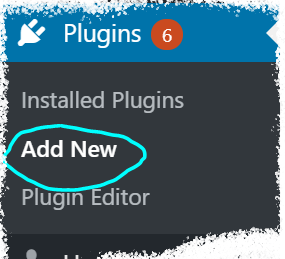
      On your Woo store admin, go to
      Plugins > Add New
      2

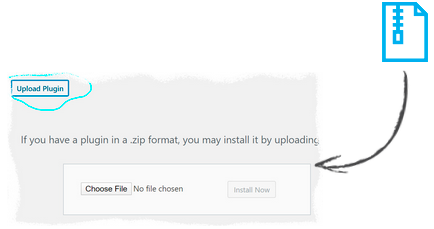
      Upload the Plugin file and
      click on Install Now
      3

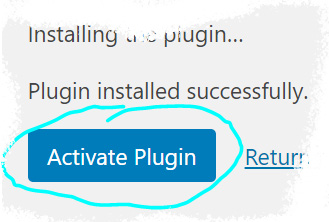
      Click on Activate Plugin

      We sent you an email

      Check your inbox for the installation instructions of AdScale for your WooCommerce Store

      AdScale for PrestaShop

      Downloading the AdScale Plugin…

      Your download will start in a few seconds.

      If it haven’t, click here.

      How to install the AdScale Plugin:

      1

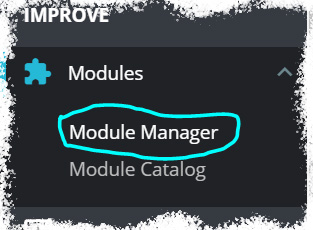
      On your PretaShop admin, go to
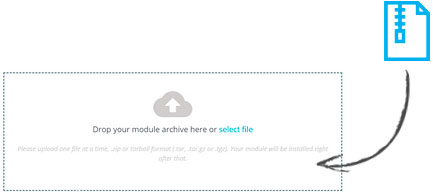
      Modules > Module Manager > Upload Module
      2

      Upload the module file

      3

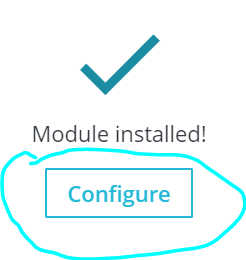
      Click on Configure

      We sent you an email

      Check your inbox for the installation instructions of AdScale for your WooCommerce Store

      Install AdScale for Magento

      Choose your preferred way to install AdScale

      Guided
      Installation
      or
      Do it
      yourself

      We sent you an email

      Check your inbox for the installation instructions of AdScale for your WooCommerce Store

      Continue

      Install AdScale for Magento

      Choose your Magento Version

      Choose your Magento version:

      Version 1.9 Version 2.1 / 2.2 Version 2.3 Version 2.4
      Continue

      Download the Magento Module:

      Downloading the AdScale Plugin...

      Your download will start in a few seconds.

      If it haven't, click here.

      How to install the AdScale Plugin on Magento 1.9

      1

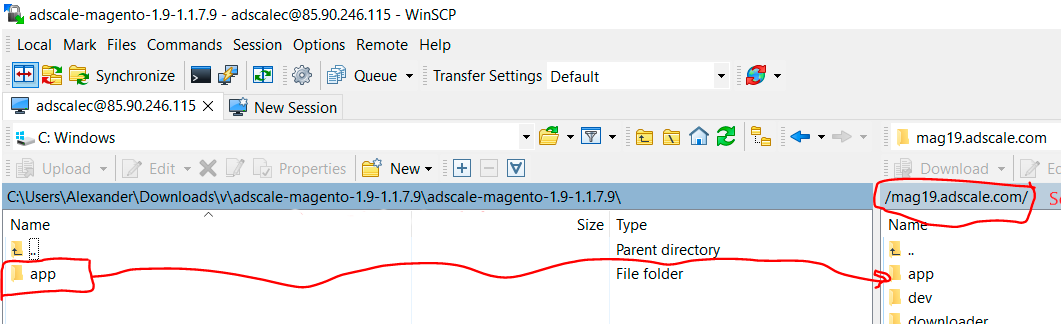
      Extract the plugin file, and using your FTP tool Upload the folder to the Magento Directory.

      2

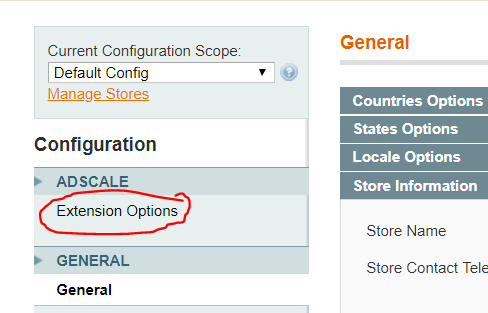
      Go to Magento Admin Panel > System > Configuration

      3

      Under AdScale, click on Extension Options

      < back

      Having troubles? Contact our support team

      Download the Magento Module:

      Downloading the AdScale Plugin...

      Your download will start in a few seconds.

      If it haven't, click here.

      1

      Extract the plugin file, and using your FTP tool Upload the folder to the Magento Directory.

      2

      Run the following commands in PHP:

      • 1. bin/magento module:enable AdScale_AdScale
      • 2. bin/magento setup:upgrade
      • 3. bin/magento setup:di:compile
      • 4. bin/magento module:status
      • 5. bin/magento setup:static-content:deploy
      • 6. bin/magento cache:clean
      3

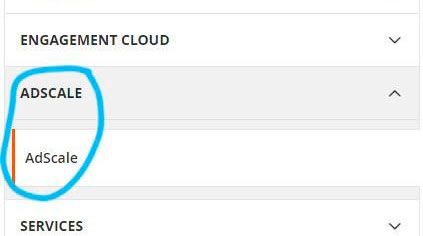
      Go to Magento Admin > Stores > Configuration and Click on AdScale > Enable

      < back

      Having troubles? Contact our support team

      Download the Magento Module:

      Downloading the AdScale Plugin...

      Your download will start in a few seconds.

      If it haven't, click here.

      1

      Extract the plugin file, and using your FTP tool Upload the folder to the Magento Directory.

      2

      Run the following commands in PHP:

      • 1. bin/magento module:enable AdScale_AdScale
      • 2. bin/magento setup:upgrade
      • 3. bin/magento setup:di:compile
      • 4. bin/magento module:status
      • 5. bin/magento setup:static-content:deploy
      • 6. bin/magento cache:clean
      3

      Go to Magento Admin > Stores > Configuration and Click on AdScale > Enable

      < back

      Having troubles? Contact our support team

      Download the Magento Module:

      Downloading the AdScale Plugin...

      Your download will start in a few seconds.

      If it haven't, click here.

      1

      Extract the plugin file, and using your FTP tool Upload the folder to the Magento Directory.

      2

      Run the following commands in PHP:

      • 1. bin/magento module:enable AdScale_AdScale
      • 2. bin/magento setup:upgrade
      • 3. bin/magento setup:di:compile
      • 4. bin/magento module:status
      • 5. bin/magento setup:static-content:deploy
      • 6. bin/magento cache:clean
      3

      Go to Magento Admin > Stores > Configuration and Click on AdScale > Enable

      < back

      Having troubles? Contact our support team

      We sent you an email

      Check your inbox for the installation instructions of AdScale for your WooCommerce Store

      AdScale for OpenCart

      Downloading the AdScale Plugin…

      Your download will strat in a few seconds.

      If it haven’t, click here.

      How to install the AdScale Plugin:

      1

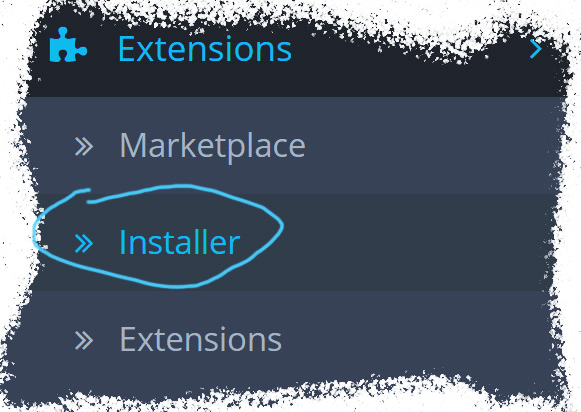
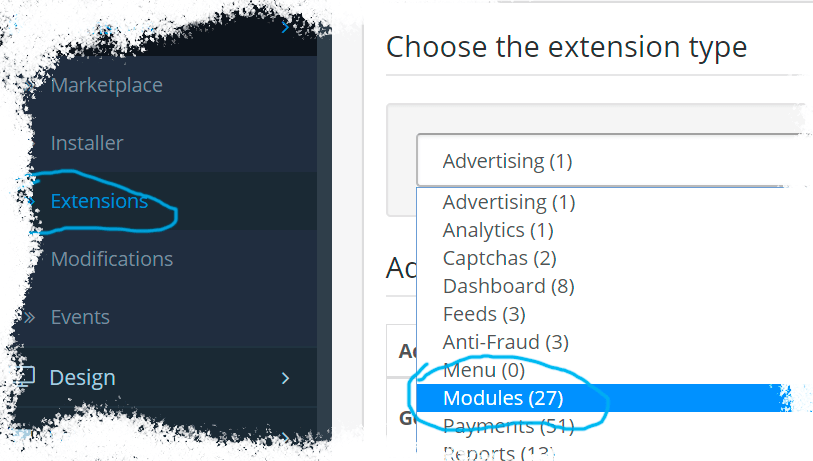
      On your OpenCart admin, go to Extensions > Installer
      2

      Upload the plugin file

      3

      Go to Extensions & pick Modules (under Extension Type)
      4

      Next to AdScale,
      click: ,
      and then

      We sent you an email

      Check your inbox for the installation instructions of AdScale for your WooCommerce Store

      Install AdScale for Magento

      Choose your Magento version:

      Opencart Ocstore 2 Opencart Ocstore 2.3 Opencart Ocstore 3 Opencart 2 Opencart 3
      Continue

      We sent you an email

      Check your inbox for the installation instructions of AdScale for your WooCommerce Store

      Watch a Demo

      Watch a Tutorial

      '..'

      Meet AdScale

      '..'